
Anthropic says its new Claude Sonnet 5.5 runs more than 30% faster than Sonnet 5 and costs up to 30% less per task in its own testing. That is useful model news, but it does not tell you whether an NSFW image generator will finish a job faster or whether an AI companion app will charge fewer credits. Before paying for either, run the same three lawful, fictional prompts through each candidate, record the full time to a usable result, and divide your spend by the number of outputs you would actually keep. Anthropic's announcement supplies the claim; your test supplies the buying decision.
What Anthropic actually announced
Sonnet 5.5 launched on September 28, 2026. Anthropic lists $2 per million input tokens and $10 per million output tokens, the same unit prices it lists for Sonnet 5. Its stated savings come from using fewer tokens to finish many tasks. For a sample text request with 10,000 input tokens and 2,000 output tokens, the listed rates imply $0.04 in model token charges: $0.02 for input and $0.02 for output. That calculation excludes any app subscription, image rendering, moderation, storage, and markup.
Anthropic also positions Sonnet 5.5 for coding, document work, and other defined tasks; it does not announce an adult image or video model. If an NSFW tool advertises a “new Claude upgrade,” ask which feature uses Sonnet 5.5: chat replies, prompt rewriting, search, customer support, or something else. A chatbot reply might change. A video renderer using a separate model will not inherit Sonnet's token economics merely because both features live on the same website.
Start with the job you actually want done
Pick one product category before comparing prices. A person choosing an AI companion may care about coherent replies over a 20-message conversation; a video creator may care about a usable five-second clip; an image editor may care about whether one specific adjustment survives three revisions. Write one pass condition for the job, such as “the character remembers the stated preference by message 15” or “the exported clip keeps the subject's face stable.” A faster response that misses that condition is still a failed result.
Use the categories on NSFWAITool's directory to build a short list of three candidates for the same job. Do not compare a text chatbot's per-message price with a video generator's per-render price. If you need both, make two separate short lists and compare each against its own output standard. This prevents an attractive but irrelevant “unlimited chat” plan from winning a video task it cannot perform.
Measure time to a usable result, not just the first response
For each candidate, run three matched trials at roughly the same hour. Start a timer when you submit a prompt and stop when you can save a result that meets your written pass condition. A chat answer that appears in two seconds but needs four rewrites can be slower than a six-second answer you keep. Record the median of three timings so one unusually busy server does not decide the purchase.
For media tools, record queue time and generation time separately. A hypothetical tool might spend 15 seconds in a queue and 45 seconds rendering, while another spends 5 seconds queuing and 70 rendering. The first has a 60-second total; the second takes 75 seconds, despite its shorter queue. Save both numbers in your notes because the bottleneck tells you whether a different model setting or a different service might help.
Calculate cost per keeper
Credits obscure the real price when failed generations still count. Suppose Tool A charges $12 for 120 credits and each image costs 10 credits. Twelve attempts appear to cost $1 each. If only four outputs meet your pass condition, you paid $3 per keeper. Tool B could charge $1.50 per attempt yet become cheaper if eight of twelve attempts are usable: $18 divided by eight is $2.25 per keeper. These are sample numbers, not current prices for any listed product.
Check the complete checkout path before using that formula. Write down the plan price, credits granted, credits consumed by your chosen setting, expiration date, renewal terms, and whether failed attempts receive a refund. NSFWAITool's review methodology calls for product-specific price and commitment checks. A “free” trial with enough credits for one low-resolution preview cannot establish the cost of a 1080p workflow.
If a product claims Sonnet 5.5 lowered its costs, ask whether the retail credit price changed. The model's $0.04 example above concerns text tokens, while a paid app may bundle other services. Even a genuine 30% drop in one backend expense can disappear inside a fixed subscription. Compare the posted price and your keeper rate before and after the update; do not convert Anthropic's model claim into a promised customer discount.
Check quality with repeatable, safe inputs
Use a small test set you own and can legally submit. For chat, try three fictional adult scenarios with distinct memory requirements, such as a character who prefers quiet dates, a second who dislikes surprises, and a third who asks to change the subject. For images or video, use original or licensed source material of adults and test three non-explicit directions: a lighting change, a camera move, and a background change. Keep the prompt and settings identical across candidates whenever the controls allow it.
Mark each output pass or fail against one visible criterion. For a video, “face and clothing remain consistent for five seconds” is easier to score than “looks good.” For a companion app, check whether the final answer respects the character detail stated at the start of the conversation. Count usable results, then keep one screenshot or export for each pass. Do not publish those samples unless you have rights to the inputs and outputs.
Treat privacy as a purchase condition
Before uploading any image, locate the service's rules for retention, deletion, visibility, and training use. Test with a synthetic or fully authorized adult image first; do not use a real person's intimate image to learn how a product works. Confirm that a private project stays private by default, then locate the delete control and verify what it says will be removed. NSFWAITool's privacy checklist covers these checks in more detail.
Make one row in your comparison notes for each privacy answer. If a site says “private” but does not explain whether uploaded media is retained or used for training, record “unknown,” not “safe.” If deletion is available only by contacting support, record that extra step. A tool can win on speed and price yet fail your purchase test because it offers no clear way to remove an uploaded source file.
Make the decision from your own scorecard
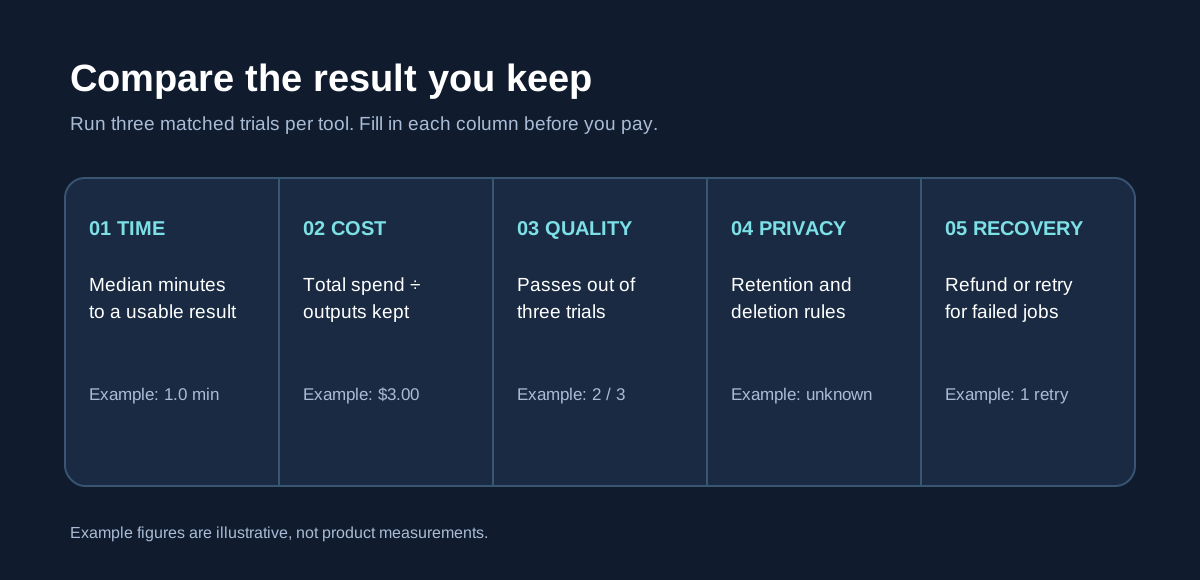
Give each candidate five columns: median usable-result time, cost per keeper, pass count out of three, privacy answer, and recovery path for a failed job. Reject any product that fails your consent or privacy requirement. Among the rest, choose the lowest cost per keeper if quality is similar; choose the higher keeper rate if repeated failures would waste a deadline. Keep the raw notes so a later plan change can be evaluated against the same baseline.
Sonnet 5.5's launch is a good reason to ask sharper questions about speed and cost. It is not evidence that every adult AI product has improved. Re-run the three-prompt test if a tool announces a model change, then update your scorecard with actual results. That gives you a defensible decision in about one short trial session instead of a guess based on a model name.
FAQ
Does Claude Sonnet 5.5 generate NSFW images or videos?
Anthropic's September 28 announcement describes a general model for tasks such as coding and document work. It does not present Sonnet 5.5 as an adult image or video generator. If a product advertises Claude, ask which exact feature calls it. Test the media engine separately with an authorized, non-explicit sample before buying credits.
Does “30% faster” mean my AI tool will be 30% faster?
No. Anthropic compares Sonnet 5.5 with Sonnet 5 in its own tests. Your app may spend most of its time queuing, rendering media, or waiting on another model. Time three complete jobs from submission to usable export and compare the median. Keep queue and render times separately to spot the actual delay.
How do I compare credit plans fairly?
Translate each plan into cost per usable result. Record the monthly charge, included credits, credits per attempt, and refunds for failures. Then run three matched prompts and count keepers. For example, a $12 pack with twelve attempts costs $3 per keeper if only four pass. Also check when unused credits expire.
What should I upload for a first test?
Use a synthetic image or an original image of an adult who gave informed permission for this exact use. Start with a non-explicit lighting or background edit so you can judge output and deletion controls without exposing sensitive material. Read the retention policy first, and verify whether your project is private by default.
Should I choose the tool with the newest model name?
Choose the tool that completes your specific job at an acceptable total cost and privacy level. A new text model may improve prompt rewriting while leaving image rendering untouched. Ask the vendor which feature changed, run your three-prompt benchmark, and compare keeper rate, median time, and deletion options with your previous notes.