
<!-- Editorial review, 2026-10-03 UTC: Read connected AI 新闻 A:F; rows 18-22 have collection timestamp 2026-10-03 08:02 UTC. Confirmed spreadsheet title and membership of specified Drive folder. Selected Apple Developer row 18; original announcement date verified October 2. Other rows concern decision-model infrastructure, scientific reports, enterprise training tasks and a fixed ChatGPT Mac vulnerability. Apple offers the clearest feature-to-permission buying question without assuming a companion integration. Primary intent: deciding whether a Mac desktop companion's Full Disk Access request is justified by the intended feature. Distinct from local October 2 cloud recipients/deletion article and October 1 voice permissions article. Homepage, /blog/, attempted /category/ai-chatbots/, methodology and privacy guidance inaccessible via web; direct homepage connection failed DNS. Live cannibalization unresolved; internal destinations reuse local context and require editor verification before publication. No current internal page contents asserted. Source describes planned controls, not a rollout date or measured security outcome. All trials and support questions below are proposed, unperformed checks. Diagram is an original decision aid, not macOS architecture. Cover prompt: conceptual unbranded laptop with empty chat bubbles beside a closed personal file cabinet and permission key; polished matte 3D editorial illustration; navy, cream, teal and amber; no text, logos, people, explicit imagery or charts. Built-in image generation used. -->
Mac Full Disk Access: Should an AI Companion Need It?
If a desktop AI companion asks for Full Disk Access, pause setup and ask which feature requires it. For someone buying character chat, a useful first trial is a typed fictional conversation with that permission left off. My judgment: do not accept broad access merely because an onboarding screen calls it necessary for a better experience.
This guide applies to buyers evaluating a Mac desktop app or a downloaded helper. If your candidate runs only in a browser, record that difference before comparing its setup with a desktop installer. A website asking you to install an extra application introduces a separate permission decision; inspect that application's purpose before continuing.
What Apple announced, and what remains unknown
Apple's October 2 Full Disk Access announcement says it plans additional controls requiring very explicit user action. Apple warns that misuse can expose personal files and communications, with growing risks from autonomous AI agents. The notice gives no rollout date or measured reduction in incidents. Treat a claim such as “the new protection is already active on every Mac” as unverified.
The announcement establishes no adult-content capability or relationship with a named companion service. If a seller cites the news in a product pitch, ask for its own release note explaining the permission request. A platform announcement cannot show that the seller's chat feature reads local documents or needs that ability.
Match the permission to the job you are buying
Write one sentence describing your intended use before installing anything: “I want typed conversations with a fictional adult character.” Add a separate sentence if you need an import feature, such as loading a character biography from a text file. This creates a concrete standard for evaluating an access request instead of accepting every optional capability during setup.
Find candidates through NSFWAITool's AI tool directory, then check each seller's supported delivery method. Record whether the offering is a website or a native desktop application. If a listing leads to a download, inspect the seller's installation guide and note any required helper. Do not infer desktop permissions from the tool's marketing category.
Apple's Mac privacy settings guide describes Full Disk Access as covering files across the computer, including other apps' data and Time Machine backups. That scope is relevant when a Mac also holds personal correspondence. For example, ask why a character biography importer needs access beyond the file you intend to select.
Inspect the request before enabling it
On a current Mac, open Apple menu > System Settings > Privacy & Security and inspect Full Disk Access, following Apple's linked guide. Record the application name shown there. If it differs from the companion's brand, ask the seller to identify it before changing the setting. Save a private note rather than posting screenshots containing unrelated app names.
Read the onboarding explanation next to the request. Copy its exact purpose into your note, such as “import existing character documents,” if that is what it says. Then ask: “Can I use typed chat without this permission?” A direct yes or no gives you a decision to test; “required for personalization” leaves the actual dependency unclear.
Check other requested permissions individually. Apple's guide lists Files & Folders separately from Full Disk Access, so do not treat those labels as interchangeable. For example, record which label appears when importing a harmless biography file. Ask the seller which narrower method it supports rather than assuming that all desktop apps implement the same file-selection behavior.
Try the core feature without broad access
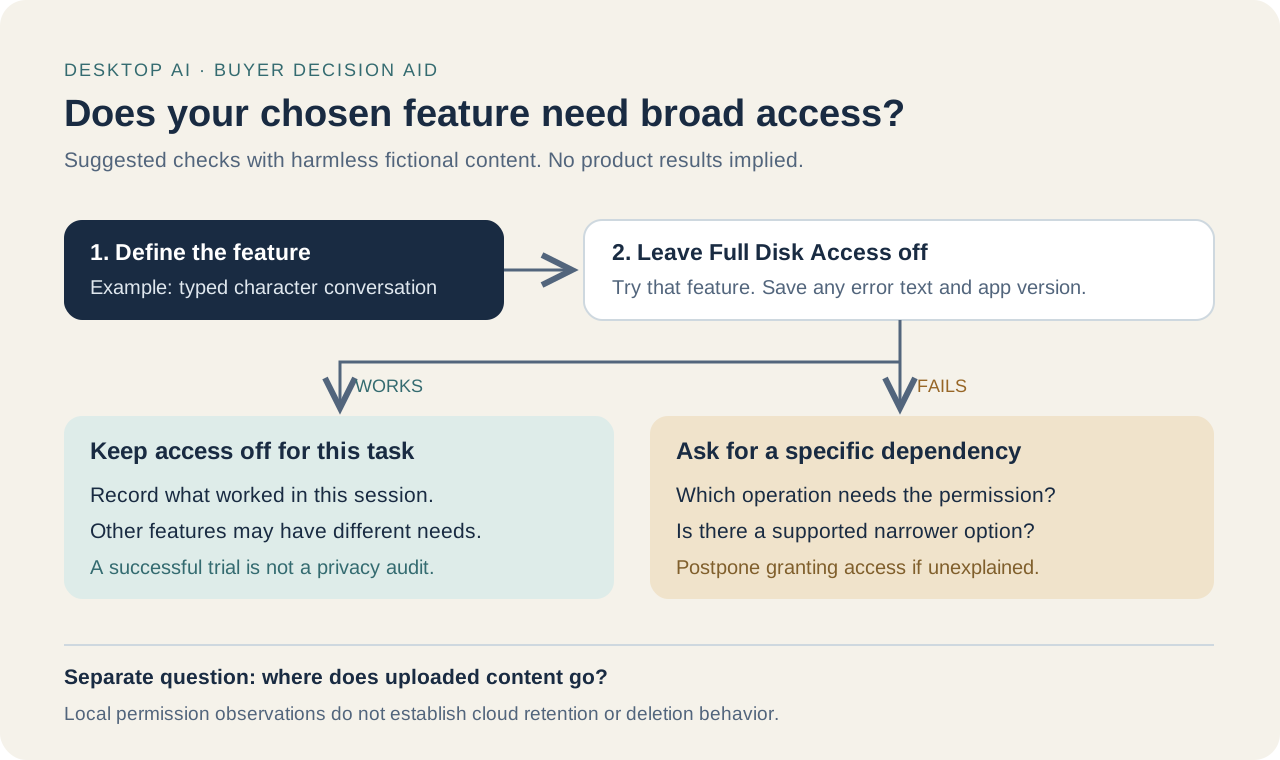
Leave Full Disk Access off during the first trial. Start a new fictional conversation with a prompt such as “You are a librarian discussing a rainy afternoon.” Record whether you can send a message and receive a reply. This is a proposed usability check, not a test result for any named product.
If ordinary chat works, repeat the task you actually plan to use, such as saving a fictional character description. Note the app version and the date. Successful chat supports a limited conclusion: that tested task worked without the permission in that session. It does not establish that every feature works or that the application's data handling is safe.
If the trial fails, preserve the error text and ask support which operation needs access. Avoid fixing the problem by enabling every requested permission at once. For example, an error during account login deserves a specific explanation before you connect it to local file access. Ask whether the seller offers a supported way to use chat without the import feature.
Evaluate an optional import feature separately
Create a harmless text file containing a fictional character's hobbies if the app documents an import option. Use that file for the trial and keep personal documents out of the experiment. Record whether the app offers explicit file selection or requires broader access. You are observing its available workflow, not proving which underlying files it can read.
Ask support to define the boundary: “Does this feature read only the document I select, or does it search other folders?” Request documentation for the installed version. If the answer describes automatic indexing, decide whether you actually want that feature before subscribing. A buyer who only needs typed roleplay can decline an optional indexing workflow without evaluating its usefulness for another audience.
Do not make an account with real intimate details just to test personalization. Use a fictional preference such as enjoying chess, and check the NSFWAITool privacy guidance for adult AI tools as an editorial reference. Ask the seller whether an imported document stays local or is uploaded; permission scope alone cannot answer that question.
Compare evidence before committing money
Use a short note for each candidate and keep the same trial prompt across comparisons. Label a statement “seller explanation” until you can observe the relevant behavior. For example, “support says import is optional” and “typed chat worked with access off” provide different evidence. Keep both entries rather than turning them into an invented privacy rating.
| Buyer question | Evidence to record | Decision it supports | | --- | --- | --- | | Does basic chat work with access off? | Dated trial note | Whether your tested task needs it | | Which feature requests broader access? | Setup text and support answer | Whether that feature matters to you | | Can you select only a test document? | Observed import workflow | Whether the offered workflow fits your scope | | Where does imported content go? | Seller documentation | Whether upload handling is explained |
Refer to NSFWAITool's review methodology when preparing evidence for editorial comparison. Include the app version in your note and retain unresolved questions. For example, a seller's explanation for a newer release may not describe the installer you downloaded. Request the matching documentation before using it as a reason to purchase.
Choose the candidate whose documented setup fits your actual task. If chat requires broad access and the seller cannot explain why, postpone that purchase or compare another option. If an optional importer is the only dependency, decide whether you need it. Neither outcome requires claiming the app is malicious, and neither substitutes for checking its handling of uploaded chat content.
FAQ
Should I grant Full Disk Access just to use character chat?
Start with the permission off and try a harmless typed conversation. Ask the seller which documented feature depends on access if chat fails. For example, an optional document importer deserves its own decision. Do not treat an unexplained setup requirement as sufficient evidence that broad access is necessary for your intended task.
Has Apple already released the announced new controls?
The October 2 announcement describes future controls but gives no rollout date. Check release documentation for your installed macOS version before assuming the change applies. For example, a seller's claim that every Mac already has the new protection needs evidence beyond the announcement. This draft reports no measured security improvement.
Does a browser companion require the same desktop permission?
Check what you are actually installing. A browser service and a downloaded companion helper are different setup choices. If a website directs you to install an application, inspect that application's permission request separately. Record the helper's name and ask which feature requires it before granting access to local files.
Is a successful trial proof that the companion is private?
No. A typed chat working with Full Disk Access off demonstrates only the behavior you observed in that session. It does not settle uploaded-message handling. For example, ask separately where chat content is processed and where imported documents go. Keep usability observations separate from seller explanations about data storage.
What if I already enabled access for a companion app?
Inspect the app's entry in Full Disk Access and consider turning it off before repeating a harmless chat trial. Record any feature that stops working and ask support about that dependency. Changing a permission is not evidence that previously uploaded content was deleted; request a separate explanation if you imported personal documents.