MiniMax M3.1 Flash Review: Open Weights, 1M Context, and Creative Workflows
Contents
- MiniMax M3.1 Flash at a glance
- What 1M context actually changes
- My creative-workflow experience
- A practical creative handoff
- Agent capabilities: useful, but integration-dependent
- Hosted API versus self-hosting
- Strengths, limitations, and who should choose it
- FAQ
MiniMax M3.1 Flash is worth considering for context-heavy creative planning, coding, and tool-driven agents. For most creators and developers, the hosted API is the sensible starting point; self-hosting is a separate infrastructure decision, not an automatic benefit of available weights. Its strongest appeal is keeping a substantial project brief, references, and revisions together while helping turn that information into actionable work.
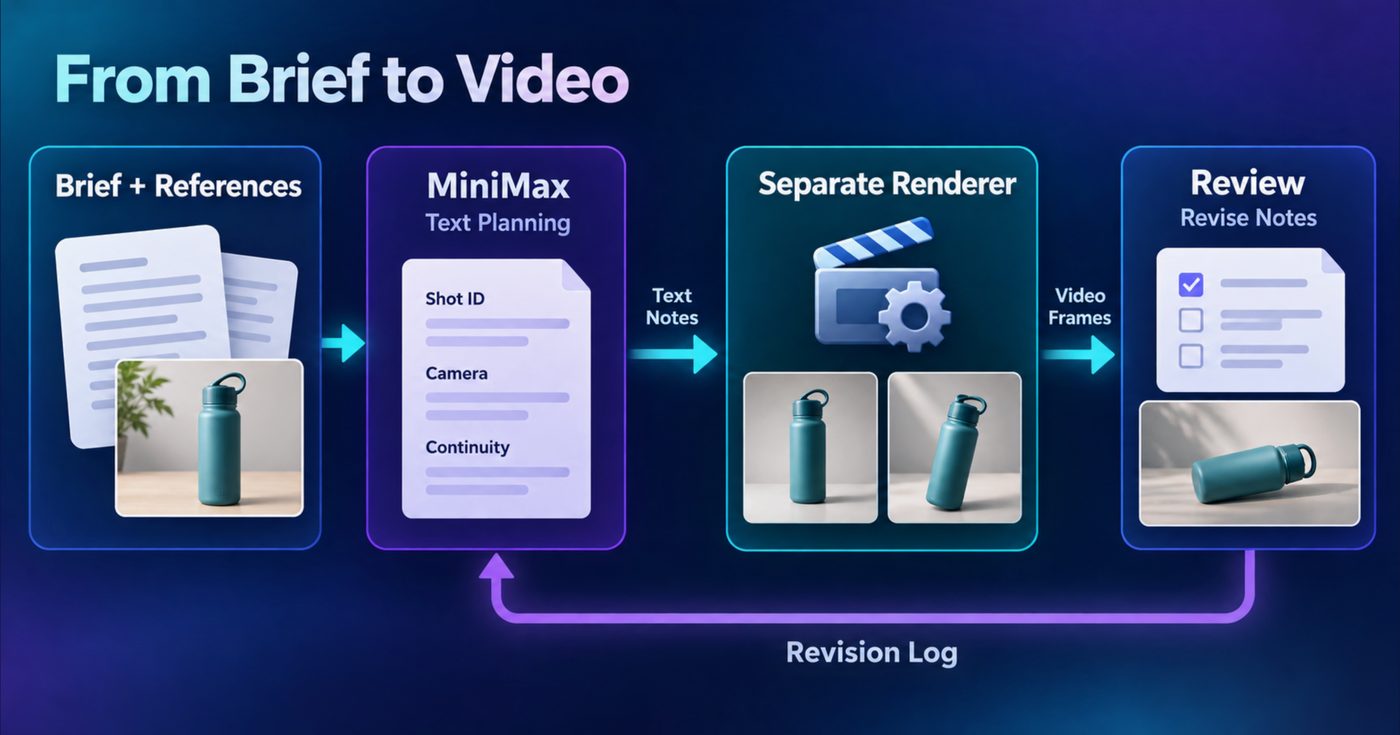
The essential distinction: MiniMax accepts text, image, and video inputs but produces text. In a video workflow, it can support planning and structured shot notes; a separate generation pipeline renders the footage. Choose it for that planning and coordination role—not as a finished video-making app.
MiniMax M3.1 Flash at a glance
| Decision factor | What to know |
|---|---|
| Model type | Native multimodal mixture-of-experts model |
| Parameters | Approximately 428B total; 23B active per token |
| Context window | Up to 1M tokens |
| Inputs / output | Text, image, and video inputs; text output |
| Weight availability | Open weights available on Hugging Face |
| Main positioning | Agentic work, coding, tool use, and computer-use workflows |
| Hosted model ID | MiniMax-M3.1-Flash |
| Deployment routes | Model-specific recipes for SGLang, vLLM, and TokenSpeed |
MiniMax announced the model on October 19, 2026, with official Hugging Face weights published on October 23. The official model card is the useful starting point for specifications, weight access, and deployment guidance.
Two specifications deserve interpretation. First, multimodal input means the model can work with more than written instructions; it does not mean every supported input modality is also an output format. Second, 23B active parameters describes computation per token—not the total amount of model weights your deployment must accommodate.
What 1M context actually changes
The practical attraction of a million-token window is less “write an enormous prompt” and more keep related project information available together.
Consider a product-video project. Its working material might include a creative brief, product descriptions, reference images, visual direction, previous shot plans, and several rounds of feedback. A smaller working context can force frequent summarization or repeated explanations. A larger window gives you room to retain more of the original material while requesting a focused revision.
That becomes useful when a change has consequences across the project. If the client replaces an outdoor setting with a studio setup, the model can be asked to identify affected shots, preserve unaffected product details, and update the plan without rebuilding it from scratch.
However, capacity does not guarantee perfect recall or correct prioritization. Nor does a large context window create automatic memory between separate API requests. Your application still needs to supply or retrieve the relevant information.
A workable project structure is:
- Current brief: the objective, audience, deliverables, and latest approved direction.
- Reference index: labeled assets or descriptions, with a short explanation of what each contributes.
- Fixed constraints: details that must remain consistent, such as product color or approved terminology.
- Decision log: what changed, why, and which earlier direction it replaces.
- Current task: the specific output needed now.
Keep approved instructions clearly separate from historical discussion. “Revision 4 supersedes Revision 2’s outdoor setting” is more useful than leaving both instructions equally prominent.
My assessment is that the context window matters most for projects with accumulated dependencies. For a short caption or isolated question, it is unlikely to be the deciding advantage.
My creative-workflow experience
In my own testing, MiniMax M3.1 Flash worked well within an adult-content workflow. After tuning the LoRA configuration in the accompanying video pipeline, I was very happy with the resulting video quality.
What I value about this arrangement is the separation of responsibilities: planning can be revised independently from the rendering setup. The positive impression concerns the overall workflow and its resulting footage, rather than treating the text model as the renderer.
That distinction also improves troubleshooting. If the intended scene is poorly specified, improve the planning notes. If those notes are clear but the visuals are unsatisfactory, investigate the accompanying generation pipeline. Changing both at once makes it harder to understand which adjustment helped.
For creators, this is a more useful way to evaluate MiniMax than asking whether a single model is responsible for every aspect of the final result.
A practical creative handoff
A straightforward way to use MiniMax M3.1 Flash is as the planning layer for a separate production tool. The following product-video example illustrates the handoff without assuming a built-in integration.
1. Assemble a compact source of truth
Start with a brief for a reusable water bottle: show its shape, highlight the lid mechanism, and finish with a clean product view. Add reference descriptions and mark non-negotiable details, such as the approved color and logo placement.
Ask the model to identify missing information before drafting shots. This gives you a chance to resolve ambiguity before it spreads through the plan.
2. Request structured shot notes
Use a stable format rather than a flowing paragraph. Helpful fields include:
| Field | Purpose |
|---|---|
| Shot ID | Keeps revisions attached to the correct shot |
| Subject and setting | Establishes what should appear and where |
| Camera direction | Describes the intended framing or movement |
| Continuity constraints | Preserves details across shots |
| Revision status | Distinguishes draft, changed, and approved notes |
An illustrative note might describe a bottle on a neutral tabletop, a slow move toward the lid, and a requirement to retain the approved product color. This is a planning document, not a promise that the renderer will follow every detail.
3. Transfer the approved plan
Copy or adapt the notes into the separate renderer’s supported controls. A developer can build an adapter, but a manual handoff is enough to evaluate whether the planning format is useful.
Do not assume that a well-formed text response guarantees valid machine-readable output. If software consumes the notes, validate required fields before submitting the next job.
4. Review and update only what changed
Record feedback against shot IDs: “Keep framing; remove background clutter” is more actionable than “make it better.” Ask MiniMax to revise affected notes while preserving approved shots.
If revisions conflict, restore a clearly marked current brief. If structured output breaks, simplify the requested fields and validate again. If the render disappoints, inspect the written plan separately from renderer settings.
This revision loop is where long context can become genuinely useful: the model has room for both the current direction and the reasoning behind earlier decisions.
Agent capabilities: useful, but integration-dependent
MiniMax positions M3.1 Flash around agentic work, coding, tool use, and computer use. For a creative team, those categories translate into several practical possibilities:
- Project organization: turn scattered notes into an asset checklist, unresolved questions, and next actions.
- Coding assistance: draft a script that validates shot-note fields or prepares approved metadata for another application.
- Tool-driven coordination: request information from connected tools, then use the returned results to update a plan.
- Computer-use workflows: interpret interface state and propose or take supported actions through an appropriate application integration.
The model endpoint is not the entire agent. An external application or agent harness supplies tools, executes calls, returns results, and manages state. Browser or desktop interaction likewise requires an execution environment; it does not appear simply because the model supports computer-use workflows.
For a first implementation, choose one bounded task. For example, let the model inspect a project manifest and propose missing metadata before allowing it to modify files. Once that works reliably for your project, add execution and verify the resulting state.
The review takeaway is straightforward: the capabilities are relevant to real production work, but their usefulness depends heavily on the surrounding software. A good planning model cannot compensate for unreliable tools or an application that loses track of completed actions.
Hosted API versus self-hosting
Hosted API: the default starting point
Hosted access removes model-serving work from your initial evaluation. You can focus on brief quality, revision handling, and whether the responses fit your application.
The supplied access details are:
- Model ID:
MiniMax-M3.1-Flash - OpenAI-compatible base:
https://api.minimax.io/v1 - Anthropic-compatible base:
https://api.minimax.io/anthropic
Choose the interface that matches your client library. Compatibility helps integration, but model-specific features and request formats still need checking in the text-generation documentation.
Start with a small text request containing a brief and a request for structured notes. Confirm that the response is usable before adding a large reference bundle, multimodal inputs, or tool calls. This isolates basic integration issues from context-management problems.
Official pricing checked October 26, 2026:
| Token category | Price per million tokens |
|---|---|
| Input | $0.15 |
| Output | $0.60 |
| Cache read | $0.015 |
These rates cover model tokens, not the separate video renderer. Cache-read pricing applies to eligible cached tokens; repeatedly sending material does not by itself establish cache eligibility. Check the pricing overview when budgeting a deployment.
A large context window is a capacity ceiling, not a recommendation to fill every request. Send the material needed for the task, limit unnecessary output, and track token usage across revision loops.
Self-hosting: more control, more responsibility
Open weights provide a deployment option for teams that want control over serving infrastructure and application integration. They do not turn this approximately 428B-parameter model into a straightforward laptop installation.
The active-parameter figure does not determine the full weight-storage or serving-memory requirement. Long-context requests also introduce substantial memory demands beyond loading weights.
Start with the model-specific SGLang cookbook or vLLM recipe. The model card also links TokenSpeed guidance. Evaluate supported hardware, runtime requirements, context configuration, and expected concurrency before committing resources.
Self-hosting means taking responsibility for installation, updates, capacity planning, monitoring, and failures. It makes sense when those responsibilities serve a concrete requirement—not merely because weight downloads are available.
Strengths, limitations, and who should choose it
The strongest case for MiniMax M3.1 Flash is a workflow that combines substantial reference material with repeated planning and revision. Multimodal inputs, a large context window, agent-oriented capabilities, and open weights make it an interesting foundation for custom production systems.
The main limitations are operational. Conflicting instructions still require organization. Tool execution needs surrounding software. Long-context serving needs resources. Final visual quality depends on the production pipeline, not just the planning model.
Choose hosted MiniMax M3.1 Flash if you want to evaluate context-heavy planning or build a tool-connected application without operating the model infrastructure.
Consider self-hosting if you have an infrastructure-capable team and a clear reason to control deployment.
Choose a finished creative application instead if your priority is opening one interface, entering a brief, and receiving a rendered video with minimal setup.
My overall verdict is positive for workflow builders: MiniMax M3.1 Flash offers a compelling planning-and-agent role. Its value is clearest when you need continuity across a project—not simply another place to ask isolated questions.
FAQ
Can MiniMax M3.1 Flash generate video directly?
No. It produces text. It can contribute planning notes to a video workflow, while a separate renderer produces the footage.
Are the weights available?
Yes. Official weights are available through the MiniMaxAI Hugging Face repository. Use the model card to find deployment guidance.
Can I run it on a consumer GPU?
Do not assume so from the 23B active-parameter figure. This is a large MoE model; consult the model-specific serving recipes for deployment requirements.
What is the easiest way to begin?
Use the hosted API with one small project brief. Evaluate the first plan, then request a targeted revision. That reveals more about workflow fit than immediately filling the entire context window.