Contents
- Current policy status
- Which edits enter the AI-label workflow?
- A seven-step OnlyFans AI label workflow
- Practical examples
- Pre-publication checklist
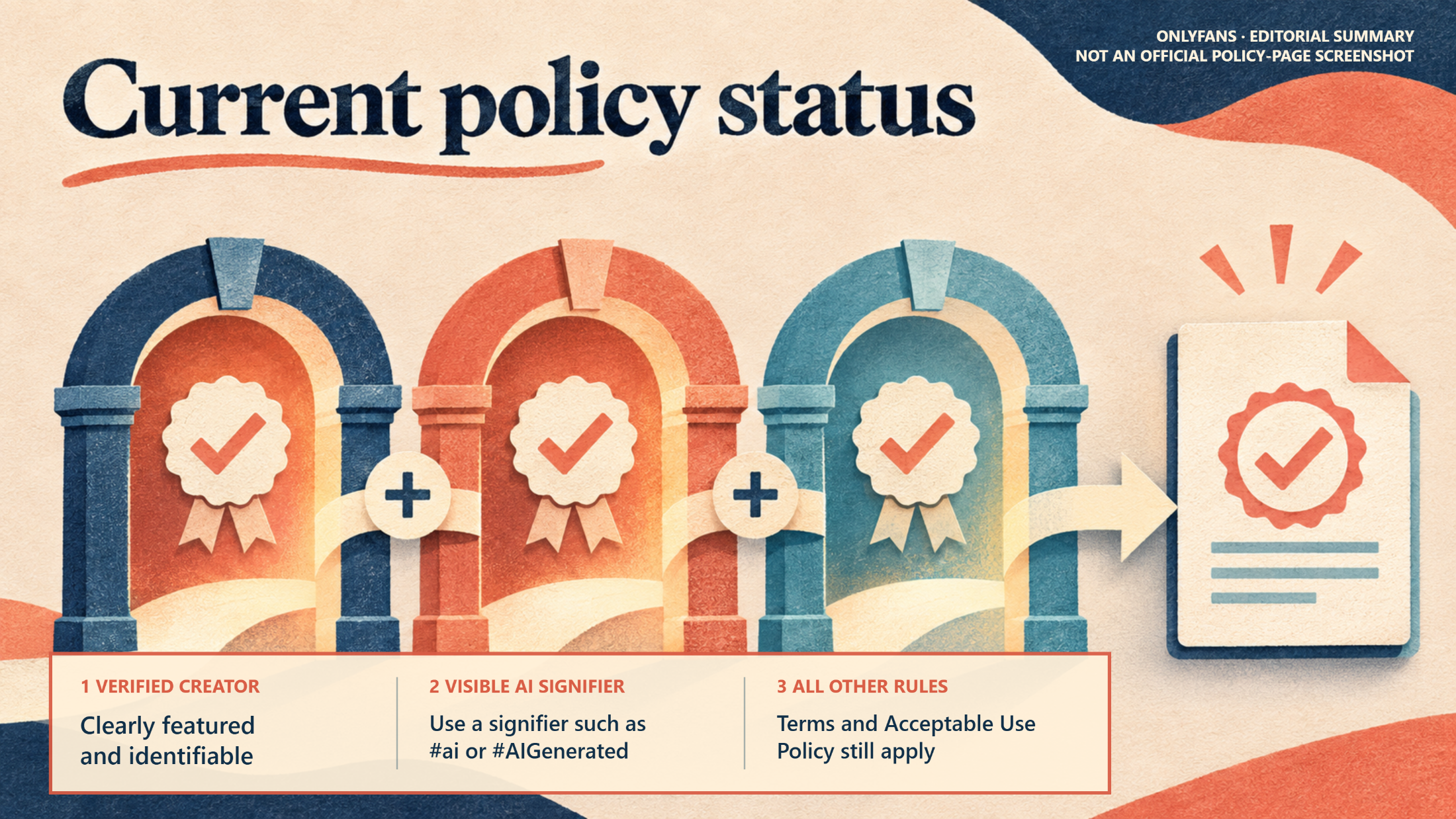
OnlyFans currently permits some AI-generated, altered, or enhanced content only when the media clearly features the verified creator, visibly identifies the use of AI, and complies with the platform’s other rules. An OnlyFans AI label does not make an unrelated synthetic model, unauthorized face replacement, or unresolved additional person acceptable.
For creators, the immediate change is straightforward: classify how AI affected each asset, confirm that the account holder remains clearly featured and identifiable, add a viewer-facing AI signifier, and preserve the source and review record before publishing.
Current policy status
Policy checked: November 6, 2026
Official materials reviewed:
- OnlyFans Terms of Service
- OnlyFans Acceptable Use Policy
- Can I post AI content on OnlyFans?
- What content can I post on OnlyFans? A Creator’s Guide to Content Moderation
- OnlyFans Content Moderation Policy
The reviewed source set did not provide a separate current page titled “Community Guidelines.” Rather than substitute an unverified URL, this guide relies on the live Acceptable Use Policy, Terms, creator-facing Help Centre guidance, and Content Moderation Policy linked above.
Confirmed OnlyFans requirements
The live Terms were marked as updated in October 2026 and were the public terms in effect when checked on November 6, 2026. The decisive conditions are cumulative: permitted AI-assisted content must “clearly feature the verified Creator” and use “a signifier such as #ai, or #AIGenerated.” It must also comply with the remaining Terms and Acceptable Use Policy.
The official Help Centre reinforces the disclosure requirement and says: “The easiest way to do this is to include the hashtag ‘#ai’.” This confirms that #ai is an official disclosure example. The Terms also name #AIGenerated as an example of a signifier.
The reviewed official materials did not document:
- A dedicated AI publishing toggle
- One mandatory hashtag for every post
- An exclusive caption sentence
- A prescribed location within a caption
- A platform-supplied visual badge that replaces the creator’s disclosure
Creators should therefore follow any publishing control that appears in the current interface, while ensuring the finished post visibly identifies the AI involvement. Do not treat suggested plain-language captions in this article as official OnlyFans label text.
| Content type | Confirmed scope | Practical publishing consequence |
|---|---|---|
| AI-edited photos | Altered or enhanced creator media falls within the AI rule | Disclose the AI involvement and confirm that the verified creator remains clearly featured |
| AI-enhanced creator media | Potentially permitted when all stated conditions are satisfied | Review reconstructed details, identity, apparent age, and added elements before publishing |
| Generated scene featuring the creator | Labeling alone is not enough; the verified creator must still be clearly featured | Compare the creator’s likeness with the source and withhold the output if identity is ambiguous |
| Wholly synthetic person unrelated to the account holder | Does not satisfy the verified-creator condition | Withhold rather than trying to cure the problem with a broader label |
| Unauthorized synthetic person or face replacement | Disclosure does not resolve identity, consent, or authorization problems | Withhold until the underlying problem is resolved |
| Another real person in the media | Normal featured-person requirements still apply | Complete the applicable age, identity, consent, release, and tagging process independently of the AI disclosure |
The identity rule is separate from the labeling rule. A post can accurately disclose that it is AI-generated and still fail the requirement that the verified creator be clearly featured and identifiable.
Recommended creator workflow
The platform rules establish the publishing conditions but do not prescribe an internal production system. The source pairing, classification fields, approval records, second-review gate, and archive process below are recommended operating practices derived from those conditions.
Keep the AI status and disclosure copy attached to the asset as it moves from editor to reviewer to scheduler. This prevents a compliant caption from being lost during a handoff and gives the final reviewer enough information to compare the source, output, and scheduled post.
Which edits enter the AI-label workflow?
Do not classify an asset solely by whether an app calls itself an editor, enhancer, beauty tool, or generator. Record what the software changed in the finished pixels or frames.
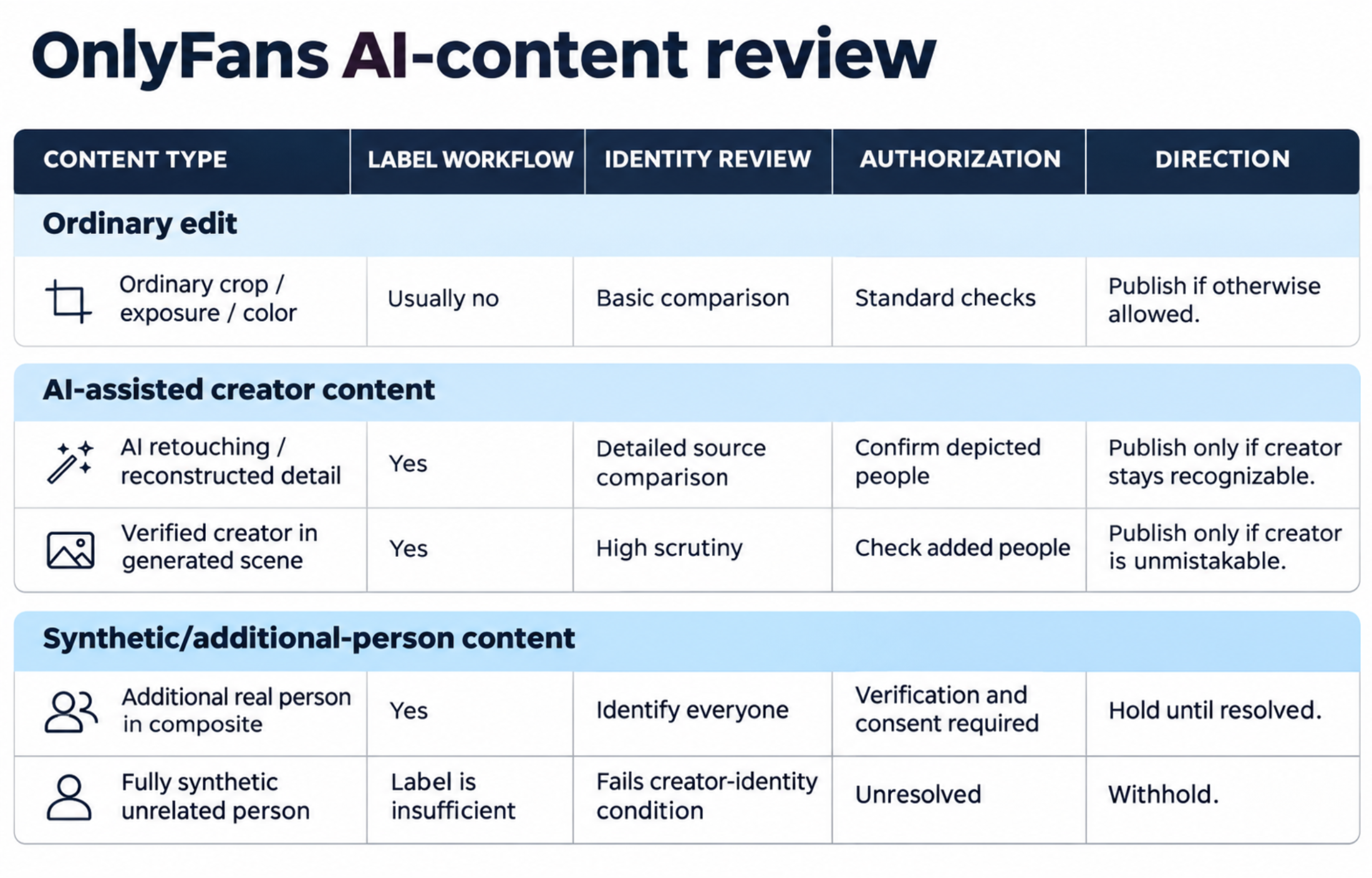
| Media operation | Working classification | Required review | Publishing direction |
|---|---|---|---|
| Crop, exposure correction, color balance, or conventional sharpening | Ordinary edit | Basic source comparison | Usually outside the generative workflow unless an AI function also generated or reconstructed content |
| AI skin reconstruction, body reshaping, generated clothing, or object replacement | AI-edited photo | Detailed source/output comparison and disclosure | Publish only if the verified creator remains clearly featured and identifiable |
| Upscaling or enhancement that invents facial or body detail | AI-enhanced media | Inspect every reconstructed area | Revise if identity or apparent age becomes ambiguous |
| Verified creator placed in a generated fantasy background | AI-assisted creator content | Check the subject, edges, reflections, background, and added figures | Potentially publishable with a visible AI signifier when the creator remains unmistakable |
| Creator likeness inserted into a mostly synthetic scene | Heavily generated creator scene | High-scrutiny identity review | Publish only when the verified creator is clearly featured and no separate rule is breached |
| Another real person added to a composite | Multi-person AI composite | Identity, authorization, consent, and tagging review | Withhold until every depicted person is properly handled |
| Wholly synthetic model unrelated to the account holder | Fully synthetic person | Fails the creator-identity gate | Withhold; an AI label is insufficient |
| Unauthorized face swap or impersonation | Unauthorized synthetic alteration | Fails identity or authorization review | Withhold |
Minor-looking retouching can still be generative. A conventional healing tool may copy nearby pixels, while an AI retouching feature may reconstruct skin, change anatomy, replace clothing, or invent a background. If a feature creates material visual information, route the asset through the AI review.
A seven-step OnlyFans AI label workflow
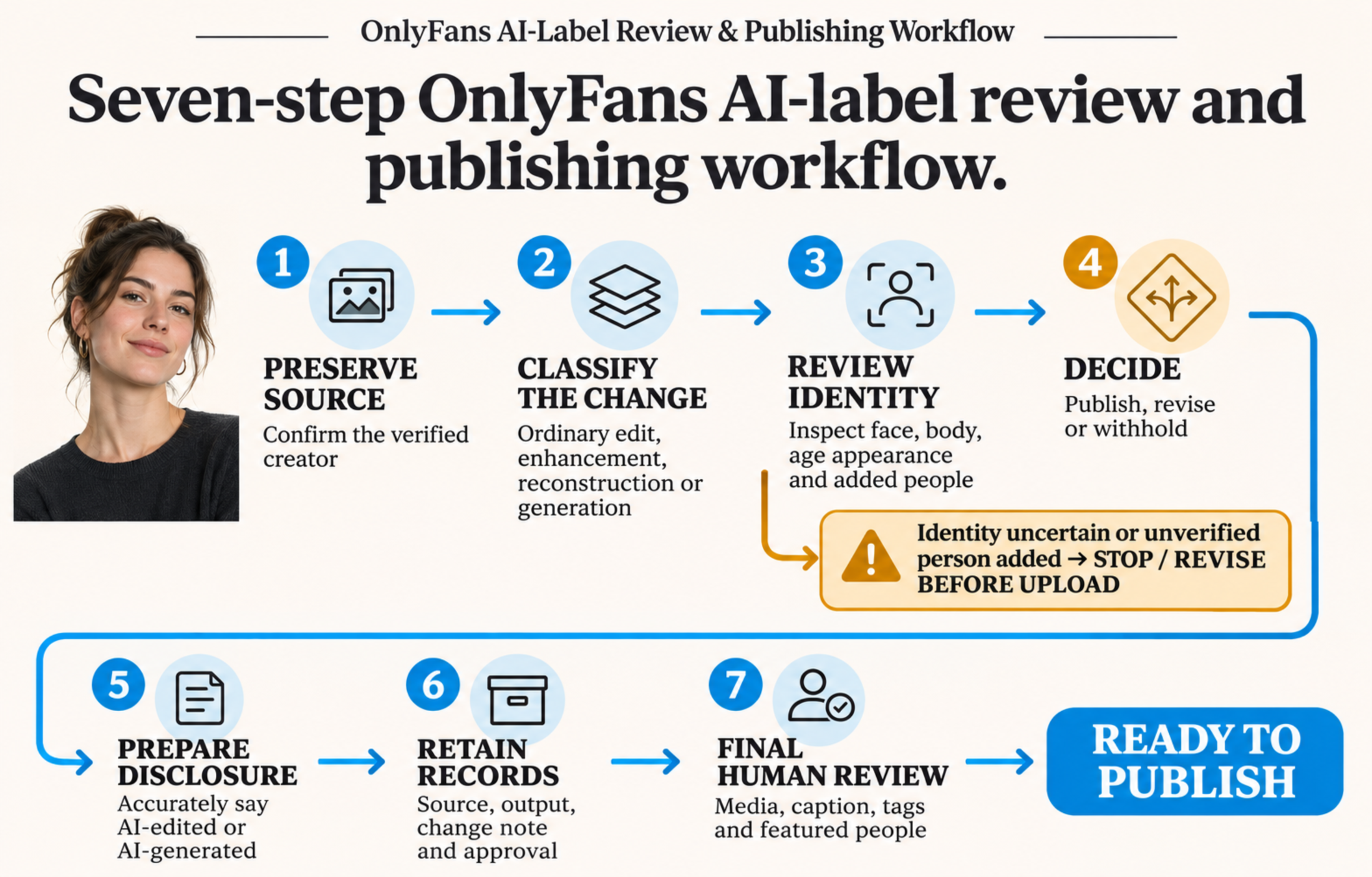
1. Preserve the source and confirm the account holder
Save the original photo or clip before generating variants. Record its location, who appears in it, and whether the verified creator is the principal subject. Inventory every source used in a composite.
Expected result: A traceable source-and-output pair tied to the correct creator.
Verify it: A reviewer can open the original, identify the verified creator, and connect it to the proposed output without relying only on the filename or editor’s description.
If another person appears in the source, resolve the applicable verification, consent, release, and tagging requirements before editing. AI processing does not remove them.
2. Record what the tool changed
Use controlled classifications such as:
- Ordinary edit
- AI enhancement
- Generative reconstruction
- Generated background or objects
- AI video interpolation or expansion
- Full synthetic generation
Add a short change note: for example, “Reconstructed skin texture and replaced the background” or “Generated connecting frames and extended the final camera movement.” Recording the operation is more useful than writing only “Edited in App X.”
Expected result: The asset has a classification that determines its disclosure and review level.
Verify it: The note identifies the affected area and whether the tool adjusted existing material or generated new visual information.
Creators assessing image-to-video systems can consult this guide to AI videos made from your own photos. Whatever tool is selected, review source identity and final output separately.
3. Inspect identity and generated elements
Compare the complete output with the source at full size. For video, inspect the timeline rather than checking only selected keyframes.
Look for:
- Changes to face shape, distinctive features, tattoos, or body structure
- A younger or materially different age appearance
- Added faces, hands, reflections, silhouettes, or background people
- Generated clothing or objects merging with the subject
- Face or body drift between video frames
- Interpolated frames that briefly resemble another person
- Background changes that alter who appears to be present
Expected result: The verified creator remains central, recognizable, and unambiguous, with no unreviewed person introduced by the tool.
Verify it: Enlarge faces, hands, reflections, background figures, and edited boundaries. For video, review the beginning, middle, end, and every generated transition.
4. Choose publish, revise, or withhold
Assign one outcome:
- Publish: The verified creator is clearly featured, the AI change is understood, the disclosure is prepared, and every other person has been properly handled.
- Revise: The creator is present, but identity has drifted, generated elements are confusing, or the edit is more extensive than intended.
- Withhold: The output depicts a synthetic stranger, adds an unresolved person, uses an unauthorized face replacement, or leaves creator identity uncertain.
Expected result: Every asset has an explicit decision before it reaches the scheduler.
Verify it: Ask whether the depicted people and media would otherwise be eligible without the AI disclosure. If identity or authorization makes the answer no, a label cannot fix the asset.
5. Prepare a visible disclosure
Confirmed disclosure requirement
OnlyFans requires AI-generated, altered, or enhanced content to be identifiable through a visible signifier. Its AI-content Help Centre page gives #ai as the easiest method, while the Terms give #ai and #AIGenerated as examples.
These examples do not establish one exclusive hashtag, caption formula, toggle, or label location in the materials reviewed. Check the live composer for any current platform control, but do not depend on internal metadata or a private production note as the viewer-facing disclosure.
Recommended plain-language disclosure
Use wording that describes the actual transformation, alongside the applicable official signifier. Examples include:
- “AI-edited portrait with AI-assisted retouching. #ai”
- “Creator photo with an AI-generated background. #ai”
- “AI-assisted video with generated connecting frames. #ai”
- “AI-generated scene featuring the verified creator. #AIGenerated”
These are editorial examples, not platform-prescribed captions. “AI-edited” suits a real creator photo with reconstructed details; “AI-generated background” is more precise when the subject is real but the setting is synthetic; “AI-generated scene” better describes a substantially generated composition.
Expected result: A viewer can understand that AI affected the media and what kind of change occurred.
Verify it: Preview the scheduled post and confirm that the signifier and plain-language description remain visible with the final media.
6. Attach production metadata and approval records
A spreadsheet, digital asset manager, or CMS can store:
- Original and output filenames
- Source-asset location
- Tool used and processing date
- AI classification and change note
- People depicted
- Consent, release, verification, and tagging status
- Final disclosure copy
- Reviewer and approval date
- Scheduled-post identifier
Embedded file metadata can support traceability, but platforms may strip it and subscribers may never see it. It does not replace the viewer-facing disclosure.
Expected result: Another team member can reconstruct why the asset was approved.
Verify it: The reviewer can locate the source, output, transformation note, authorization status, approval, and final caption from one record.
7. Run the publishing gate and retain the archive
Have one person review the final media with the exact caption, signifier, tags, and featured-person information. Higher-risk composites and generative video should receive a second review.
Check the scheduled preview and then the live post. Reopen the review if someone replaces the media, rewrites the caption, changes a tag, or reschedules through a system that does not preserve every field.
Retain the approved source/output pair, disclosure copy, and review record with the published asset. Re-audit scheduled and evergreen posts when the OnlyFans creator policy or the team’s editing practices change.
Expected result: The published media, disclosure, tags, and approval record all match.
Verify it: Compare the live post with the approved record and confirm that the verified creator is still clearly featured and identifiable.
Practical examples
AI skin reconstruction on a creator portrait
Classify this as an AI-edited photo because the system generated facial or skin detail. Compare it with the source, confirm that distinctive features and age appearance remain consistent, and provide a visible AI signifier. Recommended positioning: “AI-edited portrait with AI-assisted retouching. #ai.”
Verified creator in a generated fantasy setting
Classify the background and synthetic props separately. The image may be publishable when the verified creator remains obvious and the tool has not introduced another person. Recommended positioning: “Creator photo with an AI-generated setting. #ai.”
A clip expanded with generative frames
Review more than the original keyframes. Interpolation can cause face drift, altered anatomy, or brief background figures. Disclose the AI-assisted process and revise the clip if any generated frame makes the creator’s identity ambiguous.
A wholly synthetic model unrelated to the creator
Withhold the asset. A label accurately describing it as AI-generated does not satisfy the separate requirement that permitted AI-assisted content clearly feature the verified creator.
An unauthorized face replacement
Withhold the asset. “AI face swap” may describe the production method, but disclosure cannot supply authorization or resolve an identity problem.
Pre-publication checklist
- Is AI involved in the final pixels, frames, or composite?
- What was enhanced, reconstructed, replaced, or generated?
- Is the verified creator still central, clearly featured, and identifiable?
- Did the tool add, replace, or accidentally create another person?
- Are all real featured people properly authorized and handled under current rules?
- Does the disclosure accurately distinguish edited media from substantially generated media?
- Is an official example signifier such as
#aior#AIGeneratedvisible with the post? - Are the source, output, change notes, and approval record retained?
- Has a second reviewer checked a higher-risk composite or video?
- Does the scheduled asset match the reviewed version?
- Has someone verified the disclosure on the live post?
- Has the team checked the current official OnlyFans materials instead of relying on an older template?
For agencies, AI status should be a required intake field rather than an optional publishing note. Keep the classification and disclosure attached to the asset as it passes from editor to reviewer to scheduler. Stop publication when creator identity is uncertain, another person remains unresolved, the signifier is absent, or the scheduled file differs from the approved output.
The practical rule is simple: identify the AI operation, keep the verified creator clearly featured and recognizable, disclose the AI involvement visibly, retain the production record, and withhold outputs with unresolved identity or authorization issues. Recheck the live OnlyFans Terms, Acceptable Use Policy, and Help Centre guidance before relying on this workflow after a policy change.