Contents
- What viewers see in the Shorties feed
- How a Shortie leads to its creator
- How vertical uploads enter Shorties
- Practical format guidance
- Shorties versus ordinary Pornhub uploads
- Example: using a vertical preview as a discovery path
- Reading Shorties analytics and troubleshooting placement
- Creator checklist before publishing Pornhub Shorties is a mobile-first feed for vertically filmed videos. Viewers see one portrait clip at a time and scroll continuously, without returning to individual video pages or choosing each video from a thumbnail grid. For creators, Shorties offers a discovery channel: a clip can introduce a performer, send viewers to the creator’s Shorties library or Model profile, and, when configured, provide a path to an official external site.
Pornhub announced the Shorties feed on November 6, 2025, after earlier beta testing. Its June 8, 2026 creator update says Shorties is officially out of beta, so older articles that describe it only as an experiment no longer reflect its current status.
What viewers see in the Shorties feed
The experience is designed for a phone held vertically. Each clip fills the portrait viewing area, and a scroll moves directly to the next video. The feed supplies the next clip automatically, reducing the gap between deciding what to watch and starting playback.
Depending on the current interface, viewers may see controls for actions such as Like, Follow, Favorite, or Skip. Pornhub’s 2026 guidance also describes full-screen viewing, preference controls, and 2x playback when the viewer holds the right side of the screen. The experience resembles other short-video feeds, but its discovery controls connect each clip to Pornhub’s creator and Model-profile system.
Shorties is accessible from Pornhub’s main menu on mobile and desktop. Mobile visitors may also find a Shorties carousel on the homepage or attached to a Model profile. Placement can vary by device, account state, interface rollout, and region, so entry points may differ between visitors.

How a Shortie leads to its creator
Pornhub’s creator guidance says viewers can tap the creator’s profile icon with the plus symbol to browse that creator’s Shorties library. From there, they can explore the Model profile and other available uploads.
That makes a complete profile essential to the discovery path. Before publishing, check that the profile includes:
- A recognizable name and profile image
- A concise, current bio
- A useful collection of existing videos or Shorties
- Accurate performer and creator information
- A working official link, where appropriate
Pornhub also offers a separate More of Me feature. The profile icon leads deeper into the creator’s presence on Pornhub, while More of Me can direct viewers to the creator’s external destinations. Pornhub’s self-promotion guidance says creators can activate More of Me by adding an “Official Website URL” to the Model profile.
Creators who are still learning how Pornhub’s profiles, eligibility rules, and publishing programs fit together can consult NSFWAITool’s Pornhub SFW Creator Program guide. Shorties is a distinct distribution surface, but viewers still need a complete profile and a useful next step after discovering a clip.

How vertical uploads enter Shorties
Pornhub’s first-party documentation currently describes two publishing routes.
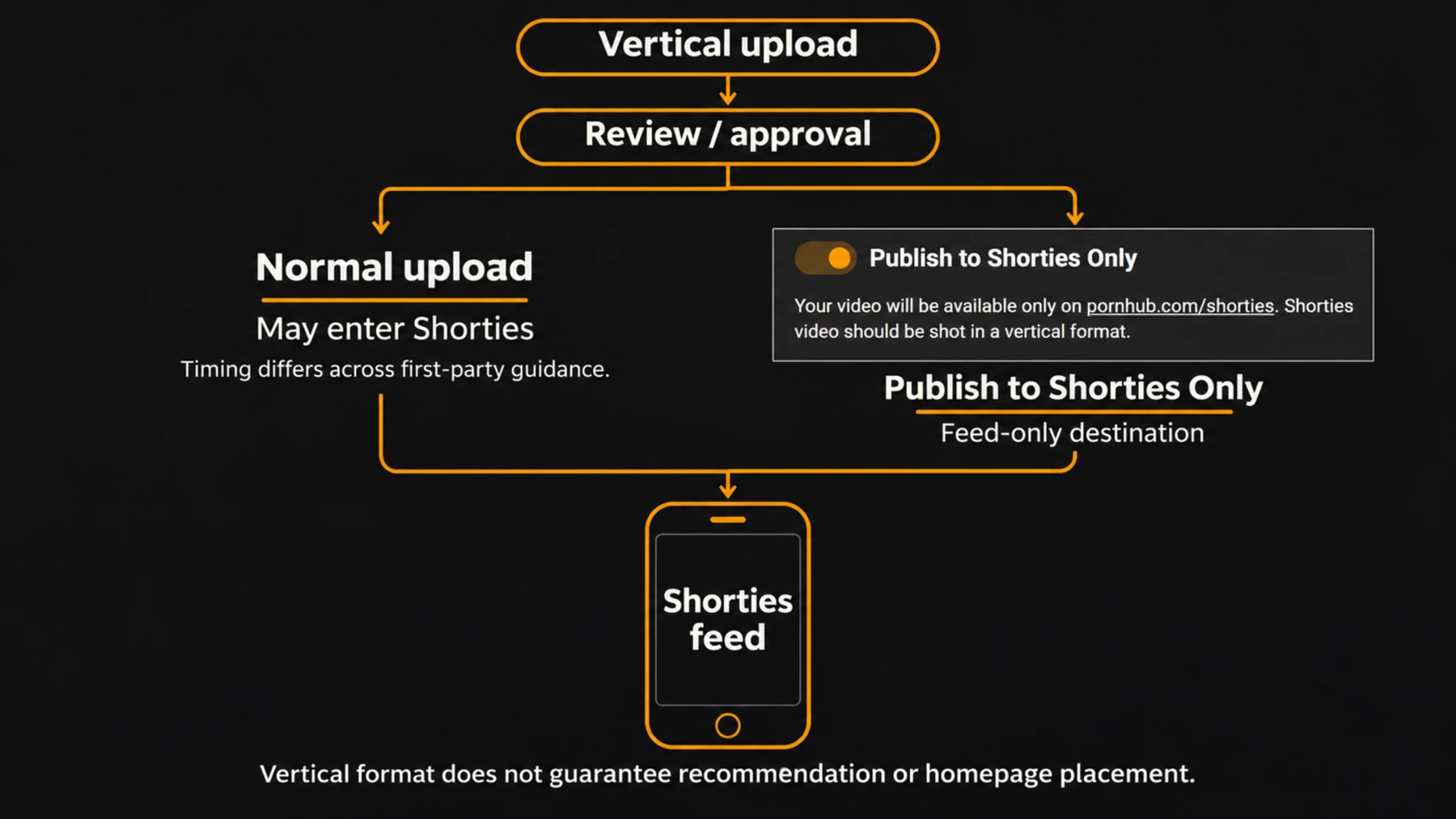
Route 1: A normal vertical upload
A creator can upload a vertically filmed video through Pornhub’s ordinary uploader, complete its title and metadata, and submit it for review. The Pornhub Help Center’s Shorties explanation says an approved upload will automatically export to the Shorties section after it gains some views.
Newer wording is broader. Pornhub’s August 14, 2026 uploader guide says a vertically shot video will automatically be published to the Shorties feed. The descriptions differ slightly on timing: the Help Center mentions approval and some initial views, while the newer guide presents publication as automatic.
In practice, submit the portrait video through the normal moderation process, then check its status and Shorties presence after approval. File orientation alone does not promise immediate feed exposure, homepage placement, recommendations, or a particular number of views.
Route 2: Publish to Shorties Only
Where the uploader displays Publish to Shorties Only, enabling it selects the Shorties feed as the clip’s publishing destination. This suits a feed-specific preview that does not need to appear as a conventional upload in the creator’s ordinary video library.
The setting controls where the clip is published; it does not promise an algorithmic boost or determine how widely the clip will be recommended.
Choose Shorties Only when a clip depends on vertical, feed-style presentation or would add little as a separate standard video page. Use the normal route when the upload should remain useful outside the scrolling feed.
Practical format guidance
Pornhub says Shorties has no hard minimum or maximum duration. Its June 2026 guidance recommends approximately 30 seconds to five minutes for engagement. “Shorties” therefore describes the presentation and discovery format rather than a strict one-minute category.
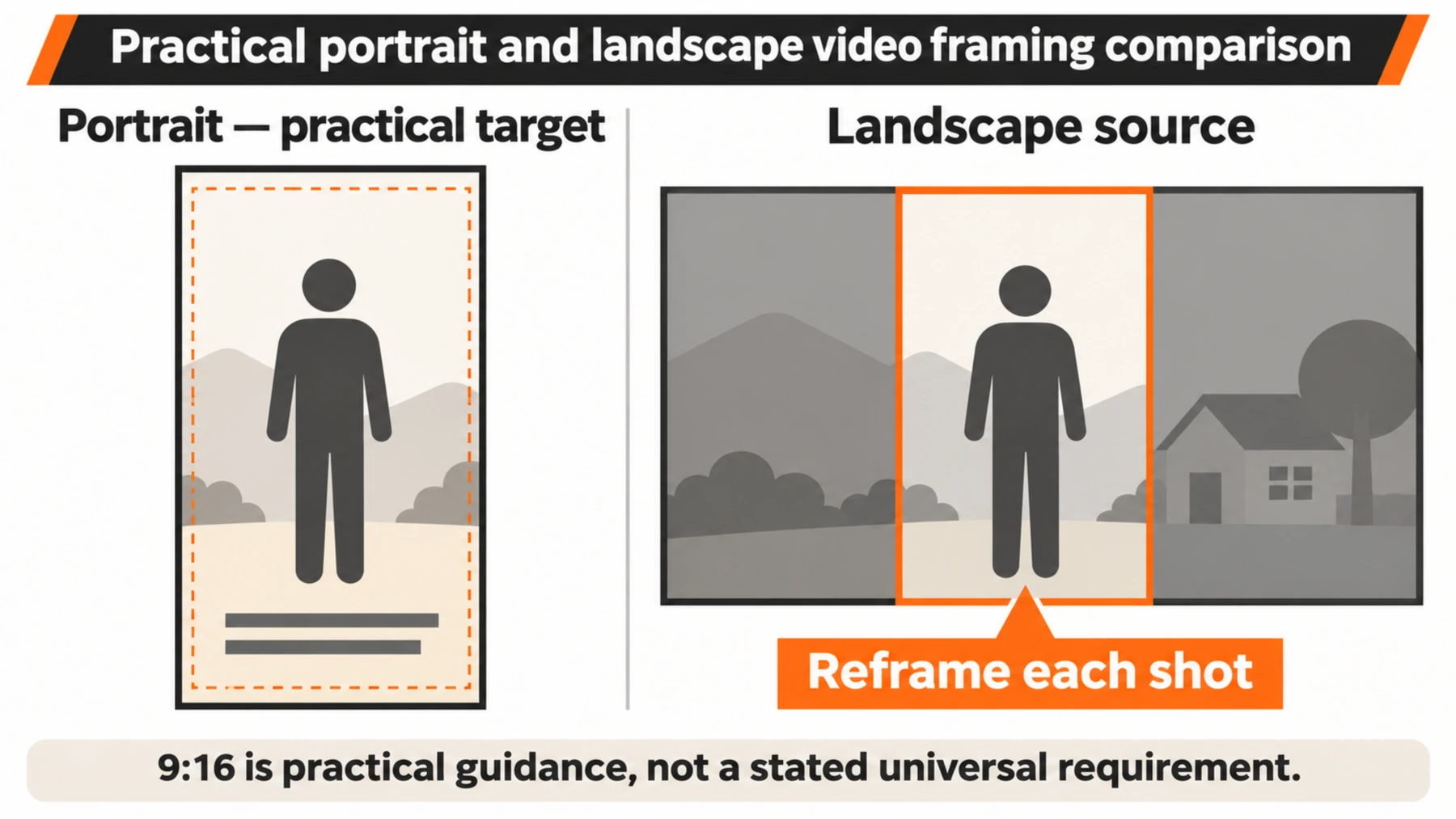
A portrait canvas such as 9:16 is a sensible production target, although the cited guidance does not present 9:16 or 1080×1920 as a universal hard requirement. The practical goal is a clip that remains clear on a vertical phone screen:
- Establish the idea immediately. Show the subject, premise, or visual change before a slow introduction gives viewers a reason to scroll.
- Keep the main subject near the center. Interface controls and cropping can obscure details placed close to the edges.
- Reframe landscape footage deliberately. A simple center crop may remove a face, gesture, prop, or important context. Reposition individual shots when needed.
- Use mobile-readable text. Keep captions brief, large, and away from likely control areas.
- Check the audio on a phone. Dialogue or music that sounds balanced through editing speakers may be unclear through a small phone speaker.
- Preview the exported file vertically. Look for black bars, tiny text, abrupt crops, stretched thumbnails, and shots that only make sense in widescreen.
Creators assembling a longer production before extracting portrait previews may find this AI adult short-film workflow useful for planning footage as separate shots. Shot-level planning makes a clean vertical edit easier than trying to recover one from a finished landscape master.
Metadata matters as well. Use a specific, accurate title and include creator or performer names where appropriate. Pornhub’s June 2026 Shorties guidance permits two to eight tags. Choose tags that accurately describe what appears in the clip; unrelated popular tags may attract the wrong viewers and do not guarantee distribution.
Shorties versus ordinary Pornhub uploads
| Dimension | Pornhub Shorties | Ordinary upload |
|---|---|---|
| Primary experience | Continuous scroll feed | Individual video page and library browsing |
| Typical framing | Portrait and mobile-first | Often landscape, although formats vary |
| Navigation | Scroll directly to the next clip | Select another video, search, or browse recommendations |
| Discovery role | Quick introduction to unfamiliar creators | Deeper viewing, search intent, and library building |
| Creator path | Profile icon, Shorties library, Model profile, and possibly More of Me | Video page, creator name, profile, related uploads, and ordinary site navigation |
| Publishing choice | Automatic vertical-video handling or a Shorties-only destination | Standard uploader and ordinary video destination |
| Duration strategy | No hard limit; roughly 30 seconds to five minutes recommended | Better suited to material that needs more time or a standalone page |
| Evaluation | Exposure, views, watch time, skipping behavior, and More of Me interest | Page views, watch behavior, search discovery, and broader video analytics |
The formats serve different stages of discovery. Shorties can provide a fast first contact, while ordinary uploads give interested viewers a larger body of work to explore. Isolated feed clips paired with an unfinished profile may attract attention without offering a convincing next action.
Example: using a vertical preview as a discovery path
Suppose a creator wants to make a mobile preview for a longer landscape production. They select one self-contained sequence, create a portrait edit, and make the premise clear within the first few seconds. Each shot is reframed to keep the main subject visible, captions remain inside a mobile-safe area, and the final export is checked on a phone.
The creator then writes an accurate title, selects several relevant tags, and updates the Model profile before uploading. If the preview does not need an ordinary video page, they select Publish to Shorties Only. If it should remain available as a standard upload, they use the normal route and monitor its status after moderation.
A viewer can encounter the clip in the feed, open the creator’s Shorties library through the profile icon, inspect the Model profile, and use More of Me if an Official Website URL has been configured. The result is a coherent discovery path without relying on a guaranteed level of reach or conversion.
Reading Shorties analytics and troubleshooting placement
Pornhub’s Help Center describes Shorties analytics that include watched clips, total watch time, exposed-but-not-viewed impressions, views, and More of Me clicks. The dashboard also provides detailed results for leading videos. These measurements can be read as a sequence:
Exposure → view → watch time → profile or More of Me action
High exposure with relatively few views can point to the opening frame, initial premise, or audience match. Views paired with weak watch time suggest the clip loses clarity or momentum after playback begins. Reasonable viewing with few downstream actions may indicate that the profile, creator proposition, or external link needs attention. Raw view counts cannot show which stage failed.
If a portrait upload does not appear where expected, check the process in this order:
- Confirm that moderation is complete.
- Verify that the exported file is genuinely vertical and plays correctly.
- Check whether Publish to Shorties Only was enabled or the normal-upload route was used.
- Inspect the creator’s Model-profile carousel, Shorties library, Video Manager, and Shorties dashboard.
- Compare exposure with actual views. Limited exposure is a different problem from viewers seeing and skipping the clip.
- Save the video URL and screenshots of its status.
- Contact Pornhub support if the upload is misclassified, remains absent after processing, or displays a distorted thumbnail.
Repeatedly re-uploading before completing these checks can create duplicate content without revealing the original problem.
Creator checklist before publishing
- Portrait framing remains clear on a phone
- The opening communicates one recognizable idea immediately
- Important subjects and text are clear of interface edges
- Audio has been checked through a phone speaker
- The title accurately describes the clip
- Two to eight relevant Shorties tags are selected
- Normal upload or Shorties Only has been chosen deliberately
- The Model profile has current imagery, a current bio, and useful content
- An Official Website URL is present if More of Me is wanted
- Moderation status and Shorties analytics are ready to be reviewed
Pornhub Shorties works as a discovery layer: a clip captures attention, the profile identifies the creator, and the surrounding library or official link gives interested viewers somewhere useful to go next.