Qwen-Image-2.1 is the latest unified image generation and editing model in the Qwen family. Only days after release, my timeline on X was already full of “wait, really?” NSFW examples. The model card describes a 7B-parameter, 32-layer single-stream DiT that handles text-to-image, image editing, and native RGBA transparency. It can take up to 10 reference images and supports local edits via bounding boxes, brush masks, or full masks.
But a 7B DiT does not mean you can just throw it onto a 16 GB card and serve it. The text encoder, DiT, VAE, attention workspace, CUDA graphs, and the output resolution all consume VRAM. For this test I deployed the full BF16 pipeline on a single NVIDIA L20 48 GB and benchmarked two serving engines: SGLang Diffusion and vLLM-Omni Preview.
The benchmark answers three questions: Is the generated output usable? How long does one image take? And does throughput rise when more clients queue up? After the 1024 baseline, I tested seven official 2K native aspect ratios, image editing with 1/4/10 reference images, 2048 editing, and compared the default runtime settings against VAE tiling.
What the generated images actually look like
The formal test used five prompt categories: realistic street scene, Chinese typography, English typography, product photography, and transparent assets. Every request kept the raw JSON payload, HTTP response, PNG output, and SHA-256 hash.
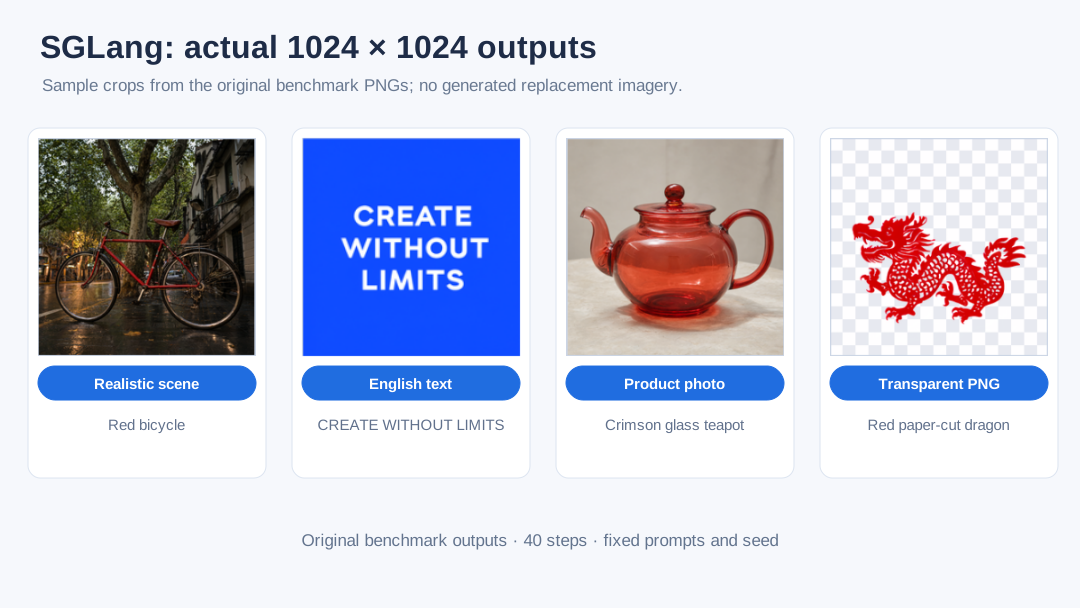
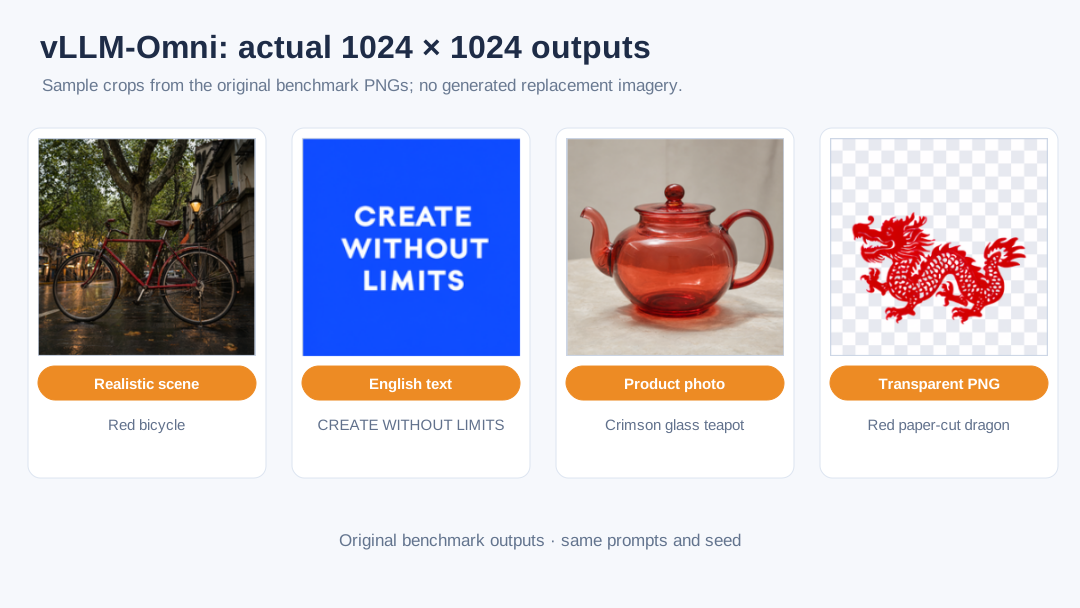
Both engines produced valid 1024×1024 PNGs. The Chinese-script test and the English text CREATE WITHOUT LIMITS came out readable in the original batch. The English edition illustrates only the English-text output, and the transparent asset was decoded as RGBA with alpha values spanning 0–255.
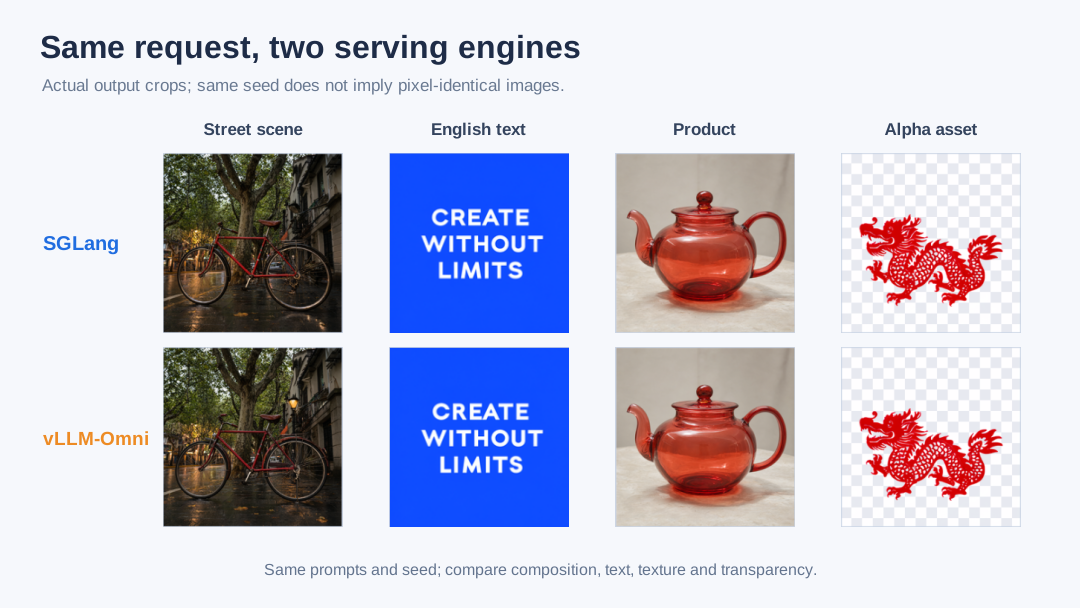
Using the same seed across engines does not guarantee pixel-identical output. The next figure puts the same prompts side by side so the comparison is about composition, text fidelity, product texture, and transparent edges rather than exact matching.
Test setup and definitions
Each server process ran on one identical GPU reading the same read-only model weights. For the 1024 baseline each concurrency level was warmed up twice and then ran 10 production requests. For the extended matrix each setting was warmed up once and ran 3 production requests. Failed requests stayed in the denominator; I did not rerun them to hide failures.
| Item | Configuration |
|---|---|
| Model | Qwen-Image-2.1, BF16 |
| GPU | Single NVIDIA L20, 48 GB |
| Engines | SGLang Diffusion; vLLM-Omni Preview |
| Resolutions | 1024 baseline; seven official 2K aspect ratios; 2048 editing |
| Steps | 40 |
| Client concurrency | C1 / C2 / C4 |
| Samples per setting | Baseline 2 warm-up + 10; extended matrix 1 warm-up + 3 |
| Output | Base64 PNG; decoded and validated as RGB/RGBA |
The extended matrix prompts are also shared with the results. For native 2K aspect ratios the prompt was a fixed product-photography description adapted to the requested aspect ratio:
A premium editorial photograph of a translucent crimson glass teapot on a black stone pedestal, dramatic studio lighting, fine caustics, crisp details, clean composition adapted to the requested aspect ratio
The 4-reference-image editing task asked the model to lay the four cards out in a 2×2 catalog while preserving each card’s digit and color. The 10-reference test asked for a two-row layout with no missing or duplicated items. Reference files were SHA-256 checked inside the deployment package so the load tester never read the wrong local file.
SGLang used a per-request dynamic batch cap; vLLM-Omni ran with --max-num-seqs 1. C2 and C4 therefore describe multiple client requests queuing in front of a single active request, not the server fusing several images into one computation.
SGLang was launched in speed mode with FlashAttention:
vLLM-Omni used Preview PR 7759, with vLLM 0.29.0b1 and vLLM-Omni 0.16.0.dev0+pr7759:
~26 seconds per image; concurrency mostly adds queue time
| Engine | Concurrency | Success | Throughput | P50 E2E | P95 E2E |
|---|---|---|---|---|---|
| SGLang | 1 | 10/10 | 2.326 img/min | 25.70 s | 26.20 s |
| SGLang | 2 | 10/10 | 2.331 img/min | 51.48 s | 51.59 s |
| SGLang | 4 | 10/10 | 2.329 img/min | 102.99 s | 103.13 s |
| vLLM-Omni | 1 | 10/10 | 2.016 img/min | 29.25 s | 30.86 s |
| vLLM-Omni | 2 | 10/10 | 2.054 img/min | 58.34 s | 58.55 s |
| vLLM-Omni | 4 | 10/10 | 2.055 img/min | 116.79 s | 116.92 s |
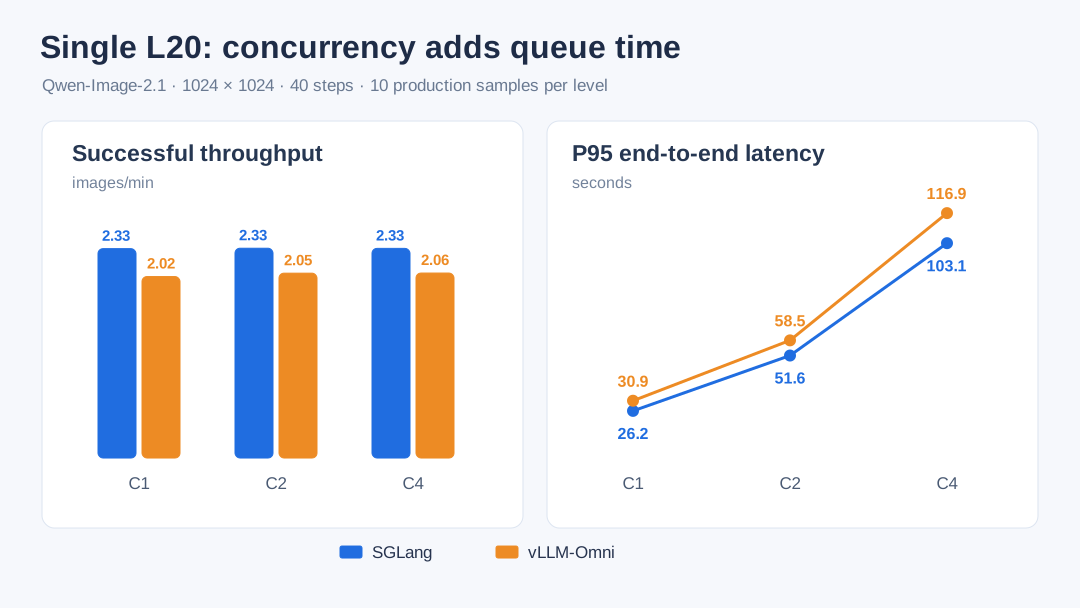
Under the current configuration, SGLang C1 throughput is 15.4% higher than vLLM-Omni Preview; at C2 and C4 the gaps are 13.5% and 13.4%. That comparison only holds for this exact combination of versions, 1024×1024, 40 steps, and single-active-request scheduling.
The concurrency curve is the more important signal. SGLang stays at about 2.33 img/min from C1 to C4; vLLM-Omni stays around 2.02–2.05 img/min. Meanwhile P95 latency roughly doubles with each concurrency step. The GPU is serializing image generation; extra clients mostly wait in line.
vLLM-Omni could be tested further with --max-num-seqs N request-level batching and the experimental --step-execution. Either may raise throughput, but would need remeasuring of VRAM, failure rate, P95 latency, and image quality.
Do all seven native 2K aspect ratios finish?
| Output size | SGLang default | SGLang tiling | vLLM default | vLLM tiling |
|---|---|---|---|---|
| 2048×2048 | 140.0 s | 140.3 s | FAIL 0/3 | 162.4 s |
| 2400×1792 | FAIL 0/3 | 146.0 s | FAIL 0/3 | 169.1 s |
| 1792×2400 | FAIL 0/3 | 145.9 s | FAIL 0/3 | 169.1 s |
| 2528×1696 | 143.8 s | 144.1 s | FAIL 0/3 | 167.0 s |
| 1696×2528 | 143.7 s | 144.1 s | FAIL 0/3 | 166.9 s |
| 2752×1536 | 140.5 s | 140.7 s | FAIL 0/3 | 163.3 s |
| 1536×2752 | 140.4 s | 140.7 s | FAIL 0/3 | 163.3 s |
With the default runtime, SGLang finished 5/7 aspect ratios; vLLM-Omni Preview failed all seven during VAE decode due to out-of-memory. After enabling tiling, both engines reached 7/7, 3/3 per setting.
Average P50 across the seven settings was 143.1 s for SGLang and 165.9 s for vLLM-Omni. For the five aspect ratios SGLang already passed without tiling, turning tiling on only added about 0.2–0.4 s. On a single L20, tiling looks less like an optional optimization and more like a required stability setting.
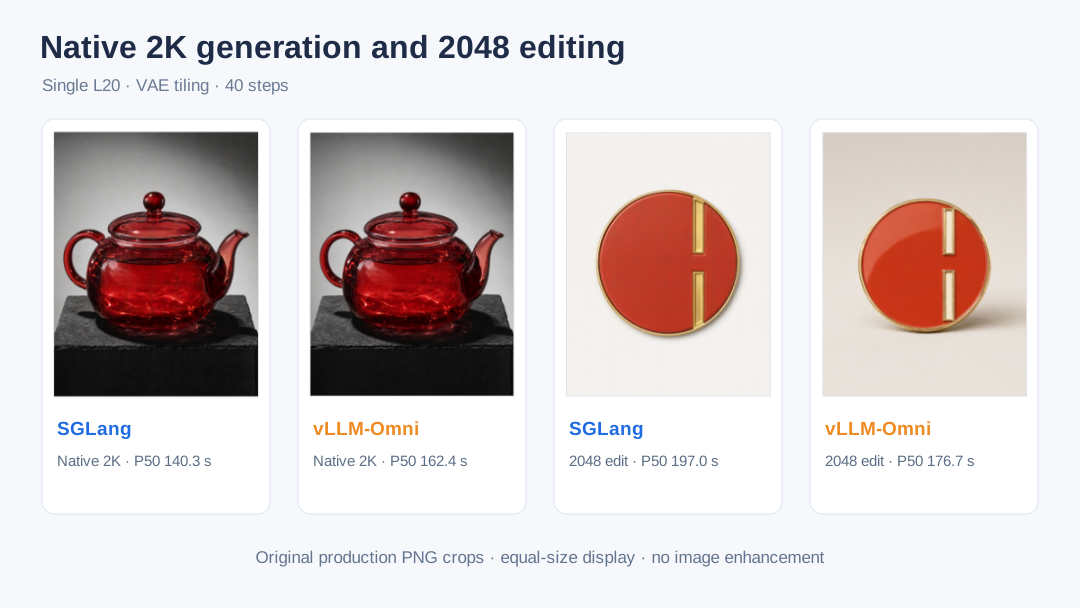
Image editing: 1, 4, and 10 reference images
The model card says 10 reference images, but model capability, server API, and single-card VRAM are three different things. I tested 1, 4, and 10 references progressively: 1 to verify the basic editing path, 4 to verify multi-image layout and semantic retention, and 10 to see whether the official limit can pass through the current runtime API and VRAM envelope. The goal was to find what the deployed service can actually accept, not just what the weights support.
| Engine / config | 1-ref 1024 | 4-ref 1024 | 10-ref 1024 | 1-ref 2048 |
|---|---|---|---|---|
| SGLang default | 30.33 s | 44.49 s | OOM | 2/3 · 196.42 s |
| SGLang tiling | not rerun | not rerun | OOM | 3/3 · 196.97 s |
| vLLM default | OOM | OOM | max 4 refs | OOM |
| vLLM tiling | 34.39 s | OOM | max 4 refs | 3/3 · 176.67 s |
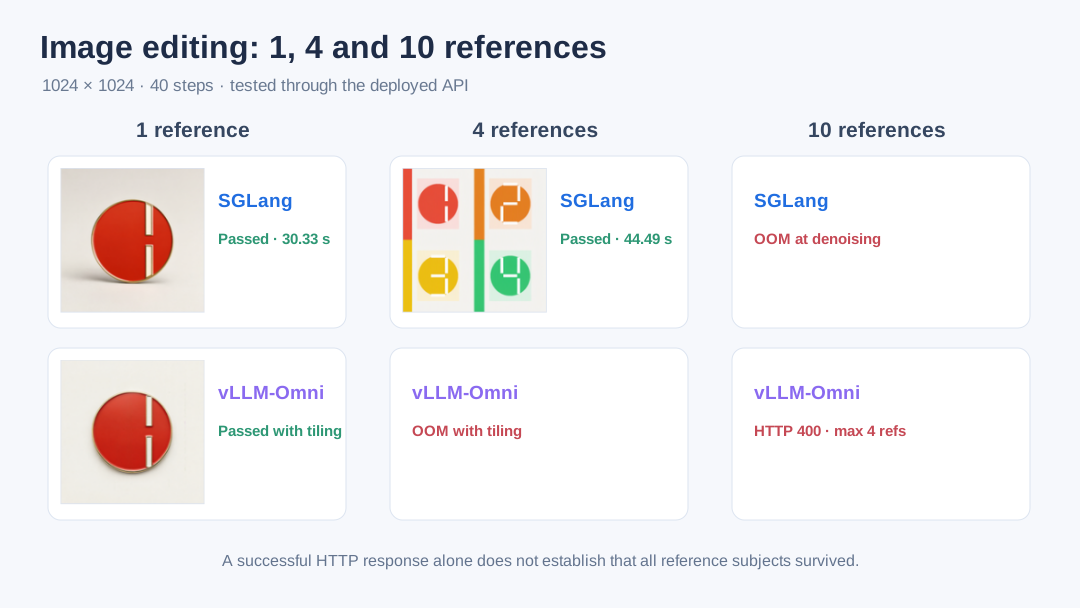
SGLang’s 10-reference request entered denoising and then OOMed while trying to allocate an extra 322 MiB. vLLM-Omni’s 10-reference request returned HTTP 400 at the API layer; the current Preview build accepts at most four input images. The official model limit is 10, but the engine, API implementation, and single-card VRAM create a narrower engineering boundary.
The 4-reference sample kept the four colors and the 1–4 ordering; the 1-reference sample rendered the digit as a more stylized vertical bar. A successful HTTP response, decodable PNG, and correct dimensions only prove the pipeline works — they do not replace visual-semantic acceptance testing.
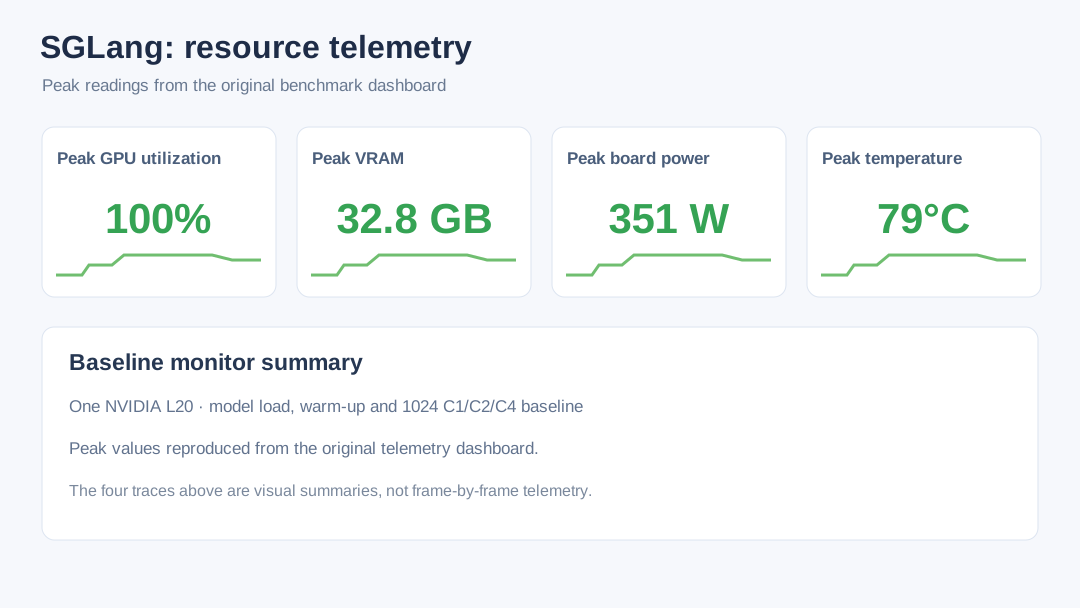
Runtime resource telemetry
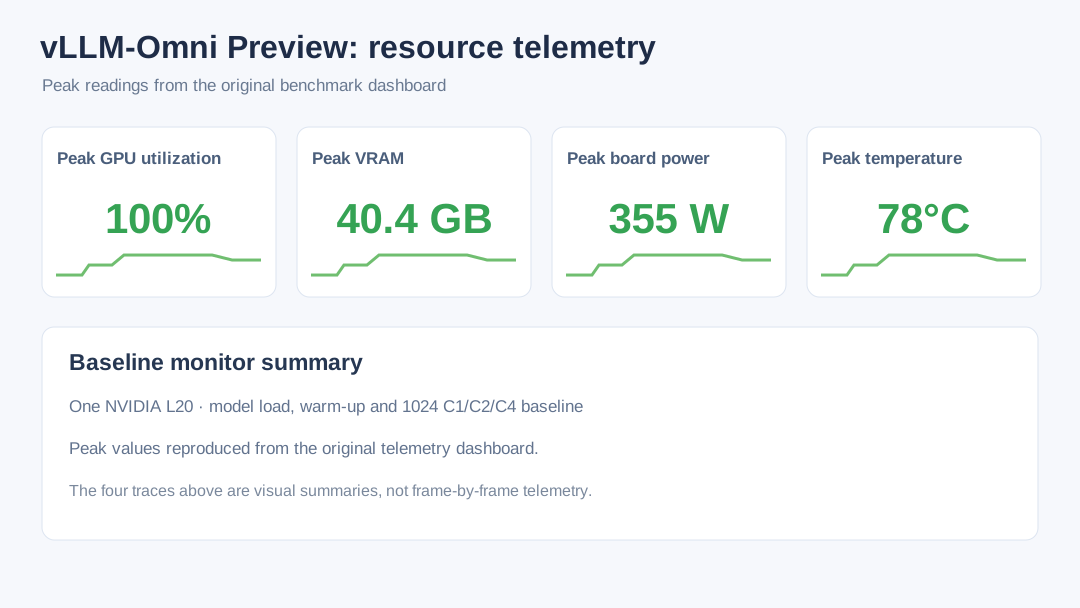
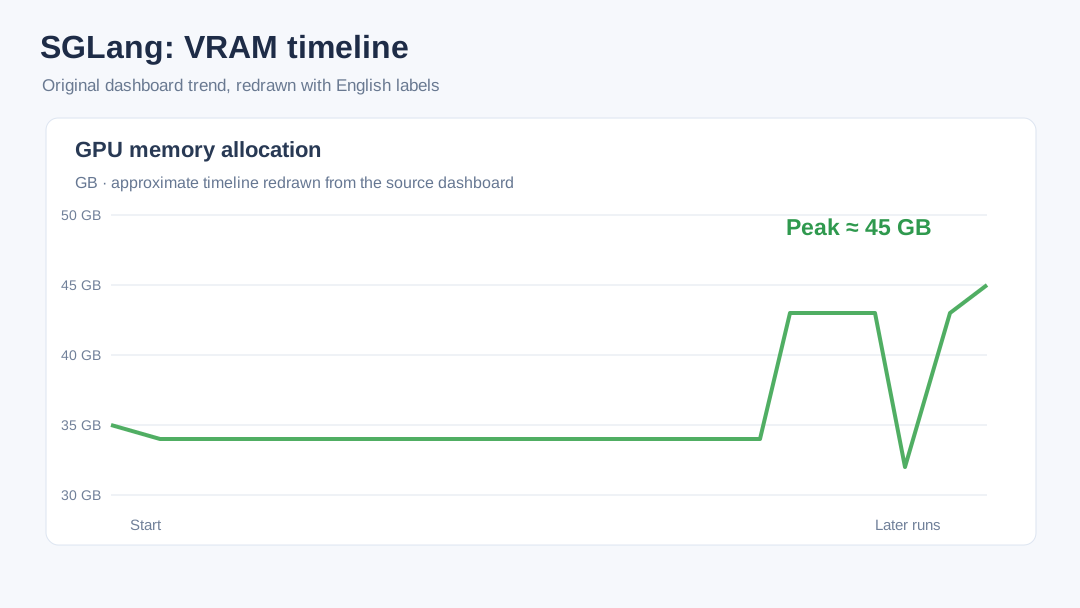
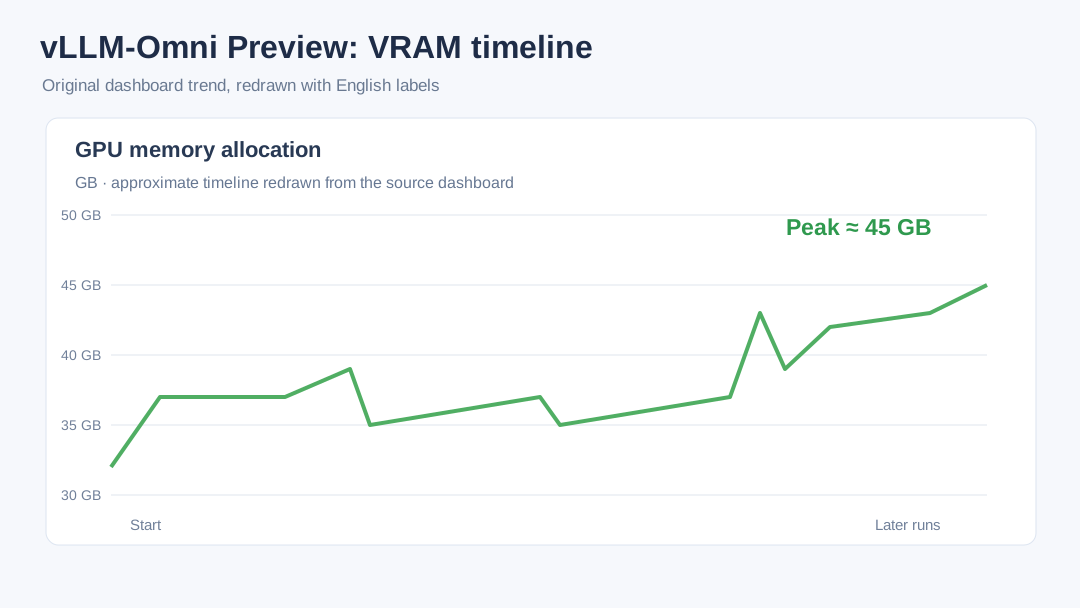
Can it run on consumer GPUs?
Consumer deployment needs three separate questions answered: can the model load? can it generate one image? and can it run continuously? 48 GB VRAM can run the full BF16 pipeline; 32 GB consumer cards will likely need VAE tiling, component offloading, or quantization; 24 GB and below usually require more aggressive CPU offload. This is a capacity estimate derived from the L20 peak measurements, not a consumer-card benchmark.
Several community quantizations have already appeared on Hugging Face, while the official Qwen repository is still BF16. The routes differ a lot:
| Route | What is public | Best for |
|---|---|---|
| ComfyUI INT8 / W4A8 | Comfy-Org provides quantized transformer and text encoder | 16–32 GB NVIDIA cards |
| GGUF Q3–Q8 | Transformer files ~3.19–7.59 GB; still needs extra encoder and VAE | Personal workstations accepting component offloading |
| W4A4 NVFP4 | Community author reports ~21.53 GB resident; RTX 5090 does 1024×1024 @ 40 steps in ~7.65 s | RTX 50-series Blackwell |
| MLX 4-bit | 10.7 GB text-to-image pack | Early Apple Silicon experiments |
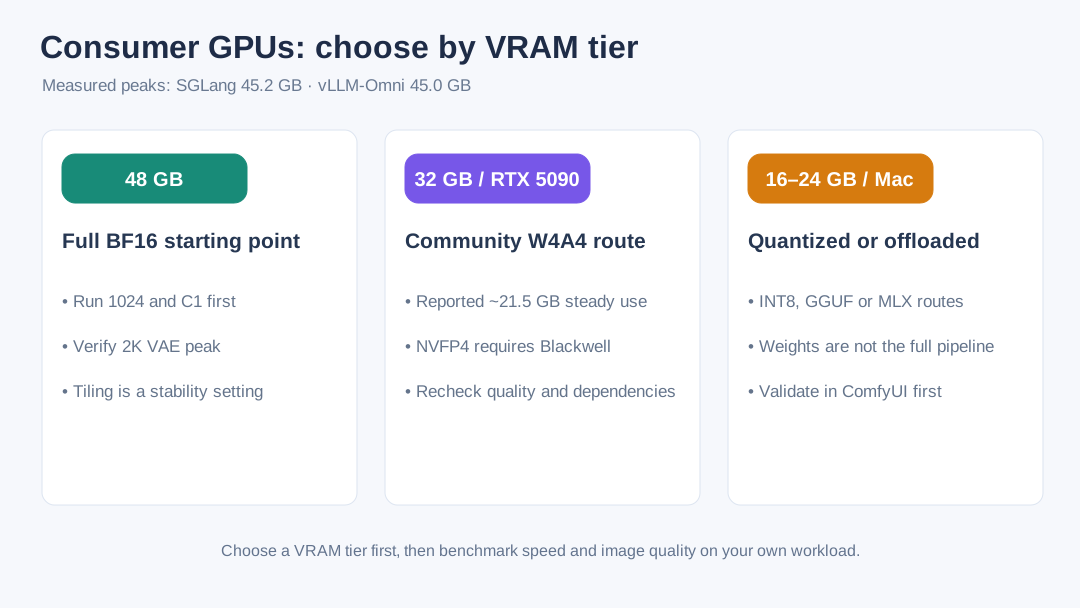
The most common trap is treating the quantized weight file size as the whole pipeline footprint. The Qwen3-VL text encoder, VAE, attention workspace, and decode peaks are still there; some builds also depend on unreleased branches or specialized kernels. Consumer deployment has to choose runtime, component precision, and editing capability together.
Even the RTX 5090’s 32 GB GDDR7 is below some of the BF16 L20 peaks measured here. The W4A4 community numbers show it can fit, but do not take community speed/quality as an official guarantee. Besides VRAM, plan for enough system RAM and fast NVMe. Personal creation is easier to start from Diffusers or ComfyUI; add a service layer only when you need LAN API access, batch queues, and unified monitoring.
Deployment recommendations
- Validate images before tuning throughput. Lock a set of prompts and check text accuracy, transparent PNG, output size, and failure responses before scaling server-side batching.
- Cap queue depth. Set the in-flight request limit based on the server’s real parallelism, or queue time will hide the true per-image latency.
- Step up resolution gradually. When moving from 1024 to 1536 to 2048, re-record peak VRAM, per-image latency, and OOM boundary.
- Keep raw evidence. Save PNGs, request parameters, raw responses, and SHA-256 hashes separately so you can return to the exact request when debugging quality or protocol issues.
- Pin versions. Fix model revision, image digest, runtime, and generation parameters. Rerun the baseline after upgrading SGLang, vLLM-Omni, Diffusers, PyTorch, or the driver.
For the underlying launch parameters, de-identified CSVs, summary JSON and full-resolution outputs, see the original benchmark source.