
Introduction
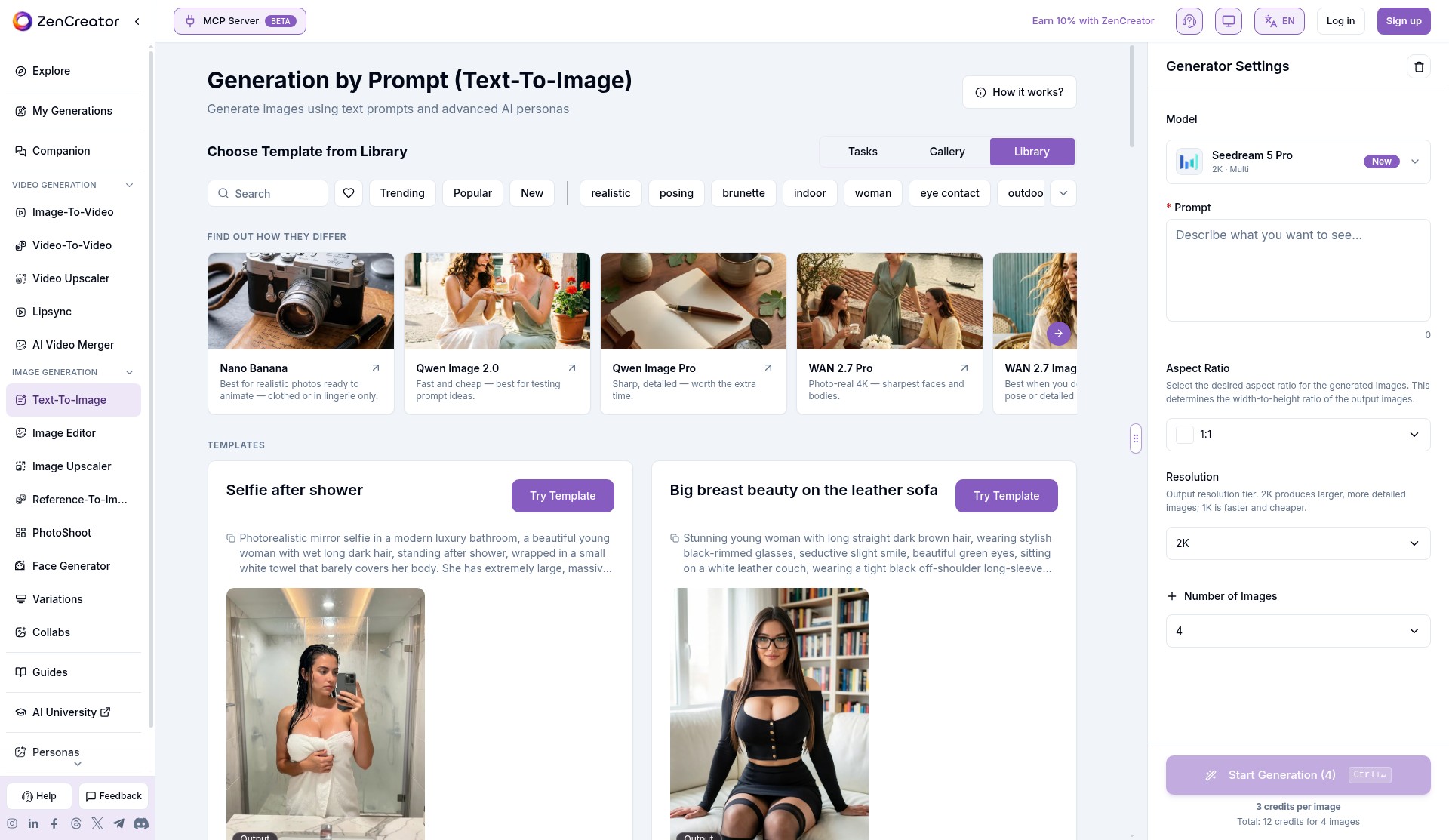
ZenCreator is built for creators who want a full pipeline instead of a single button. You generate or import a character still, refine it with the image editor, LoRAs or upscalers, run a head/face swap when you need identity control, then send the same frame into image-to-video, video-to-video, lip sync or a merge tool without bouncing between separate sites. That continuous workspace is the product’s real advantage over one-trick generators.
Output quality is strong across the board for this category. Still tools reach up to 4K on several models, video runs through multiple families (Wan Spicy / Prime Spicy, Seedance Spicy, Kling, MiniMax and others) with duration and resolution choices shown before you spend, and face work includes full head swaps with hair rather than a flat face paste. Generation is fast enough for iterative work—marketing pages cite roughly fifteen seconds for typical images and under a minute for many video jobs—and failed jobs return credits automatically.
The trade-off is commitment. Billing is one-time credit packs starting at $19.99 for 200 credits, with no free onboarding credits. Until the first successful payment lands, NSFW generation, 18+ templates/LoRAs and some trusted-only tools stay locked. Pack prices can also vary by payment provider, so the Billing page total—not a marketing table—is what you actually pay.
Pick ZenCreator if you want an adult creation suite with non-expiring credits, card and crypto checkout, and enough models to cover stills through short video. Skip it if you only need a free one-click template clip or refuse to buy before you can try NSFW output.
Merits
- Full adult pipeline in one account: text-to-image, image edit, face/head swap, upscale, image-to-video, video-to-video, lip sync and merge
- Credits never expire and spend across every tool and model
- Per-job credit cost shown under Generate before you commit; failed generations refund credits automatically
- Broad NSFW video model menu (Wan Spicy / Prime Spicy, Seedance Spicy, Kling, MiniMax and more) with resolution and length choices up to longer clips on selected models
- Card, Apple Pay, Google Pay, crypto (USDT/USDC) and several regional methods—no Telegram Stars lock-in
- One-time packs instead of a subscription, so you are not auto-renewed into another month
- MCP and public API for builders who want the same tools outside the dashboard
- Editing rank near the top of the directory’s NSFW AI Editing list, with solid placement in hentai generator and video categories
Disadvantages
- No free trial or free onboarding credits; NSFW and several advanced tools stay locked until the first paid pack (Trusted Status)
- Entry pack is $19.99 / 200 credits—fine for stills, but high-end 1080p / longer Spicy video burns credits quickly
- List prices can differ by payment provider; always confirm the Billing page total
- Used or partially used packs are non-refundable (failed jobs are the automatic refund path)
- The studio is feature-dense; beginners who want a single preset button may feel lost compared with template shelves like PlayBox or PlayPeach
- Content and safety screening still apply: illegal and non-consensual material is blocked even after Trusted Status
Key Features
Image generation and editing
Text-to-image and reference-to-image cover photoreal, anime and stylized looks, with model options such as Seedream, Flux Klein Spicy, Z-Image Spicy, Qwen Image and WAN image variants. Typical stills cost about 1–3 credits depending on the model and resolution tier. The image editor, variations, photoshoot and upscaler tools sit on the same balance, so you can iterate a character without buying a second product. That edit-then-animate loop is why ZenCreator ranks so well among NSFW editing sites.
Face and head swaps
Head & Face Swap is a trusted-status feature set: face-only or full head with hair, including awkward poses, usually at 1 credit per image on the standard routes (higher for some Seedream Pro paths). For creators who need a consistent identity across stills before animation, this is one of the cleaner in-suite options in the directory.
NSFW video
Image-to-video and text-to-video are the headline adult features once Trusted Status is on. You pick a model family, resolution and length; cost scales with those choices. Lightweight Seedance Pro Fast clips can start at a few credits for short 480p runs, while Wan 3.0 Spicy / Prime Spicy and Seedance 2.5 Spicy at 1080p and longer durations climb into the tens or hundreds of credits per clip. Video-to-video, lip sync (billed per second of audio) and a simple merger round out post-production without leaving the app.
Credits, Trusted Status and payment
Credits are the only currency. Official help packs (source of truth over marketing pages): Starter 200 for $19.99, Creator 550 for $49.99, Influencer 1,200 for $99, Professional 6,300 for $499. Credits do not expire and work on every tool. The first successful purchase grants permanent Trusted Status, which unlocks NSFW generation, 18+ templates/LoRAs and trusted-only tools such as certain text-to-video and face-swap paths. Payment methods include multiple card rails, Apple Pay, Google Pay, gift-card flows, card-via-crypto and direct USDT/USDC on listed networks; local methods appear in some countries. There is no subscription auto-renew.
Privacy and rules
ZenCreator markets private, encrypted handling of generations and account-level deletion (Settings or email; media removal targeted within 30 days). Prompts and uploads are screened for prohibited content, including automated age estimation and public-figure checks aimed at blocking minors and non-consensual likeness abuse. Adults-only use is required. Operator: Dimeris Ltd, Limassol, Cyprus.
Editor Score
ZenCreator is one of the strongest all-in-one adult creation suites in the directory for people who will actually use editing, face work and video together. Its biggest strength is that non-expiring credit pool stretched across a serious model menu instead of a thin template shelf. Its main limitations are the paid unlock for NSFW and a credit burn rate that punishes casual 1080p video experiments. Buy the Starter pack once to unlock Trusted Status and learn the cost of your usual jobs, then move to Creator or Influencer only after you know which models you keep.
| Criterion | Score |
|---|---|
| Output quality and model depth | 18 / 20 |
| Ease of use and workflow | 16 / 20 |
| Feature breadth and creative control | 19 / 20 |
| Pricing and payment | 16 / 20 |
| Privacy and safety posture | 19 / 20 |
| Total | 88 / 100 |
Rate Plans
List prices from ZenCreator’s Billing help article (October 2026). The in-app Billing page can show different totals by payment provider. Credits never expire; there is no free trial.
| Plan | Price | Who it suits |
|---|---|---|
| Starter | $19.99 · 200 credits (~$0.10/credit) | First unlock of Trusted Status; light stills and short low-res video tests |
| Creator | $49.99 · 550 credits (~$0.091/credit) | Regular image/edit users who animate a few clips |
| Influencer | $99 · 1,200 credits (~$0.083/credit) | Heavier video and batch creators |
| Professional | $499 · 6,300 credits (~$0.079/credit) | Studios and high-volume pipelines |
| API / MCP | Same credit balance | Builders wiring ZenCreator into agents or products |
Approximate burn guide from the published cost list: many stills are 1–3 credits; a short Seedance Pro Fast 480p clip can be about 2 credits; a 5s Wan 3.0 Spicy 1080p clip is listed around 50 credits (Prime Spicy slightly less). Always read the Generate button total for the exact charge.
Alternative Tools
| Tool | Why compare it |
|---|---|
| PlayBox | Category-leading template video and removal workflows with a simpler shelf. Pick PlayBox for one-tap scenes; pick ZenCreator for multi-model editing and non-expiring studio credits. |
| SpicyBox | Top-shelf AI porn video with Mini Movie creation and card payments when available. Pick SpicyBox for polished short-form video focus; pick ZenCreator when you also need heavy still editing and face/head swaps in the same balance. |
| ClothOff | Editing/removal-oriented peer higher in some discovery lists. Pick ClothOff for a narrower undress/edit job; pick ZenCreator for the wider image-to-video and model menu. |
Frequently Asked Questions
What is ZenCreator?
ZenCreator is an adult AI creation suite in the browser for images, edits, face/head swaps, upscaling and short NSFW video, billed with one shared credit balance.
How much does ZenCreator cost?
Credit packs start at $19.99 for 200 credits, with larger packs at $49.99, $99 and $499. There is no subscription. Confirm the Billing page total for your payment method.
Is ZenCreator free?
No. There is currently no free trial or free onboarding credit. NSFW features unlock after the first successful credit purchase.
What is Trusted Status?
Trusted Status is granted automatically after your first paid credit pack. It unlocks NSFW generation, 18+ templates/LoRAs and several advanced tools, and it stays on the account permanently.
Do credits expire?
No. Unused credits do not expire and can be spent on any ZenCreator tool.
Can I pay with a card or crypto?
Yes. Supported options include card rails, Apple Pay, Google Pay, gift-card flows, card-via-crypto and USDT/USDC on listed networks, plus some local methods by country.
What happens if a generation fails?
Credits for failed jobs on ZenCreator’s side are returned automatically. Used credits on successful or started jobs are not refundable.