
Introduction
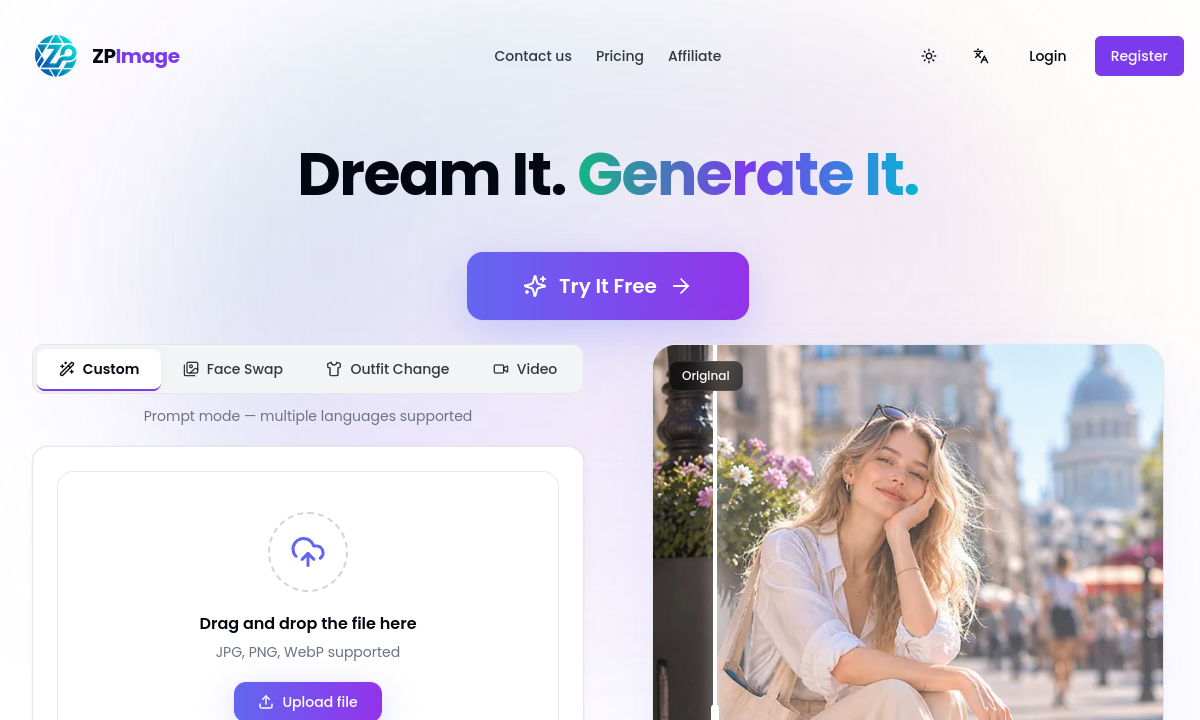
ZPImage runs a three-step workflow: upload an image, write a prompt describing the edit, and download the result. For NSFW image work, this loop means you can test outfit swaps, background changes, or scene rewrites without navigating layered editors or waiting in queues. The interface accepts JPG, PNG, and WebP files through a drag-and-drop field, then hands your prompt to an engine called Nano Banana 2. That engine is the only one listed on the homepage, so whatever ZPImage produces comes through this single pipeline. If it handles your subject well, iteration is fast.
The homepage claims sub-ten-second generation times powered by an optimized inference pipeline. For adult content creators working through multiple variations of a pose, outfit, or scene, that speed changes the creative rhythm. You can describe one look, see it rendered, adjust the prompt, and regenerate within the same minute. The site also advertises high-resolution, commercially usable downloads, meaning outputs are not watermarked previews locked behind a paywall gate at the export stage. Whether those claims hold under heavy use or with complex prompts is something only a paid session confirms.
Multi-language prompt support is explicitly listed: English, Japanese, Chinese, and more. This matters for NSFW creators who describe scenarios, poses, or aesthetics in languages other than English and want the AI to parse that instruction directly rather than forcing a translation step. A prompt written in Japanese describing a specific costume or mood should, in theory, reach the model without distortion. The homepage presents this as a core feature rather than a footnote, suggesting the underlying model was trained or fine-tuned on multilingual data. Accuracy across languages remains unverified by third parties.
The listed transformation types are style transfer, background swap, outfit change, and image-to-video. Style transfer lets you restyle a photo into anime, vintage film, or other aesthetics. Background swap replaces the scene behind a subject via prompt description. Outfit change is the most directly relevant for NSFW wardrobes and costume edits. Image-to-video converts a still into a short cinematic clip. Each tool works through the same upload-and-prompt flow rather than offering separate interfaces, which keeps the experience unified but limits fine-grained control over individual effects.
ZPImage includes references to an activation code system and credit-based usage. The pricing page exists but does not display plan details to logged-out visitors. Code redemption instructions appear in the site's localization strings, indicating that credits are purchased or gifted through codes rather than a standard subscription cart. This setup is common in adult AI tools that sell through third-party affiliate or reseller channels. Before buying, confirm what credits cost, what each generation deducts, and whether unused credits expire. The site does not answer these questions on its published pages.
The privacy policy and terms of service pages both display 'Under construction' with no substantive content. For any tool handling personal photos—especially NSFW material—this is a concrete gap. You cannot determine how uploaded images are stored, processed, or retained. The homepage also references API key creation and an affiliate commission program, confirming backend infrastructure beyond what a casual user sees, but none of that infrastructure comes with published data-handling commitments. If you plan to upload sensitive content, treat this absence as a real risk until policies are published.
Merits
- Sub-ten-second generation time keeps rapid iteration practical for multiple outfit or scene variations.
- Multi-language prompt support removes the translation step for creators working in Japanese, Chinese, or other languages.
- Unified upload-and-prompt workflow for style transfer, background swap, outfit change, and video in one interface.
- Commercial-use download policy on outputs, with no mention of watermarks or resolution locks on final files.
Disadvantages
- Privacy policy and terms of service pages are under construction with no published content.
- Pricing is hidden behind sign-in; no plan details, credit costs, or refund terms are publicly visible.
- No community features, user galleries, or independent feedback are available on the site.
- Single engine with no option to switch models or adjust generation parameters beyond the text prompt.
Key Features
Style Transfer
Restyle any uploaded photo into artistic looks such as anime or vintage film through a single prompt.
Background Swap
Describe a new scene and the AI replaces the background behind the subject without manual masking.
Outfit Change
Modify clothing in an image via prompt, directly supporting costume play and wardrobe edit workflows.
Image-to-Video
Convert a static image into a short cinematic video clip using the same prompt-based flow.
Multi-Language Prompts
Write instructions in English, Japanese, Chinese, and other languages for direct model interpretation.
Fast Generation
Results claimed in under ten seconds through the optimized Nano Banana 2 inference pipeline.
Editor Score
ZPImage earns its place on speed alone. The sub-ten-second pipeline and unified prompt workflow make it one of the fastest tools for quick NSFW image edits. Hidden pricing and missing legal pages are real friction points that block a full endorsement.
| Criterion | Score |
|---|---|
| Generation Speed | 18 / 20 |
| Prompt Simplicity | 17 / 20 |
| Transformation Versatility | 15 / 20 |
| Transparency and Trust | 9 / 20 |
| Cost Clarity | 8 / 20 |
| Total | 67 / 100 |
Rate Plans
ZPImage does not publish pricing on its public pages. The site references credits and activation codes, which points toward a credit-pack purchase model redeemed through codes rather than a standard subscription checkout. Before spending anything, sign in to confirm what each credit pack costs, how many credits a single generation deducts, and whether unused credits carry over. If you find pricing only through a third-party reseller or affiliate link, verify the total charge at checkout before entering payment details.
| Plan | Price | Who it suits |
|---|---|---|
| Credit Packs | Shown after sign-in | Credit-based generation for images and video; activation codes referenced for redemption and discounts. |
Plan pricing, credit costs, billing terms, and refund policy are not published on any public page. The terms and conditions page displays 'Under construction.'
Alternative Tools
| Tool | Why compare it |
|---|---|
| PlayBox | PlayBox focuses on community-built motion templates and image-to-video animation, offering templated control over how a subject moves. ZPImage offers broader image editing including style transfer and background swap alongside video. Choose PlayBox if you want reusable animation presets from a creator community; choose ZPImage if your work centers on static-image transformations with fast turnaround. |
| AI Undress CC | AI Undress CC lets you try undressing effects without creating an account, with a free daily limit and standard queue. ZPImage requires sign-in and credits before any generation. If you want an anonymous first test of AI undressing, AI Undress CC removes that barrier. If you need outfit change, background swap, or video in addition to undressing, ZPImage covers more transformation types in one place. |
| ClothOff | ClothOff provides a catalog of action and pose templates, costume transformation, face swap, and batch uploads, with coin packs purchased at checkout. ZPImage sticks to prompt-based editing without a preset catalog or batch mode. For varied NSFW presets and face manipulation, ClothOff offers more built-in variety. For quick, prompt-driven single-image edits, ZPImage is the more streamlined option. |
Frequently Asked Questions
What does ZPImage's Nano Banana 2 engine do?
It is the single diffusion model powering all image and video generation on the platform, described on the homepage as delivering photorealistic results with fast inference.
Can I write prompts in languages other than English?
Yes. The homepage lists English, Japanese, Chinese, and additional languages as supported for direct AI interpretation.
What file formats does ZPImage accept?
JPG, PNG, and WebP, as shown on the upload interface.
Are ZPImage outputs usable commercially?
The homepage states outputs are high-resolution and available for commercial download. No additional licensing terms are published.
How is ZPImage priced?
Pricing is not publicly listed. The site uses credits and activation codes. Sign in to view available plans and costs.
Is my data safe with ZPImage?
The privacy policy page displays 'Under construction' with no substantive content. No data-handling commitments are currently published.