
Introduction
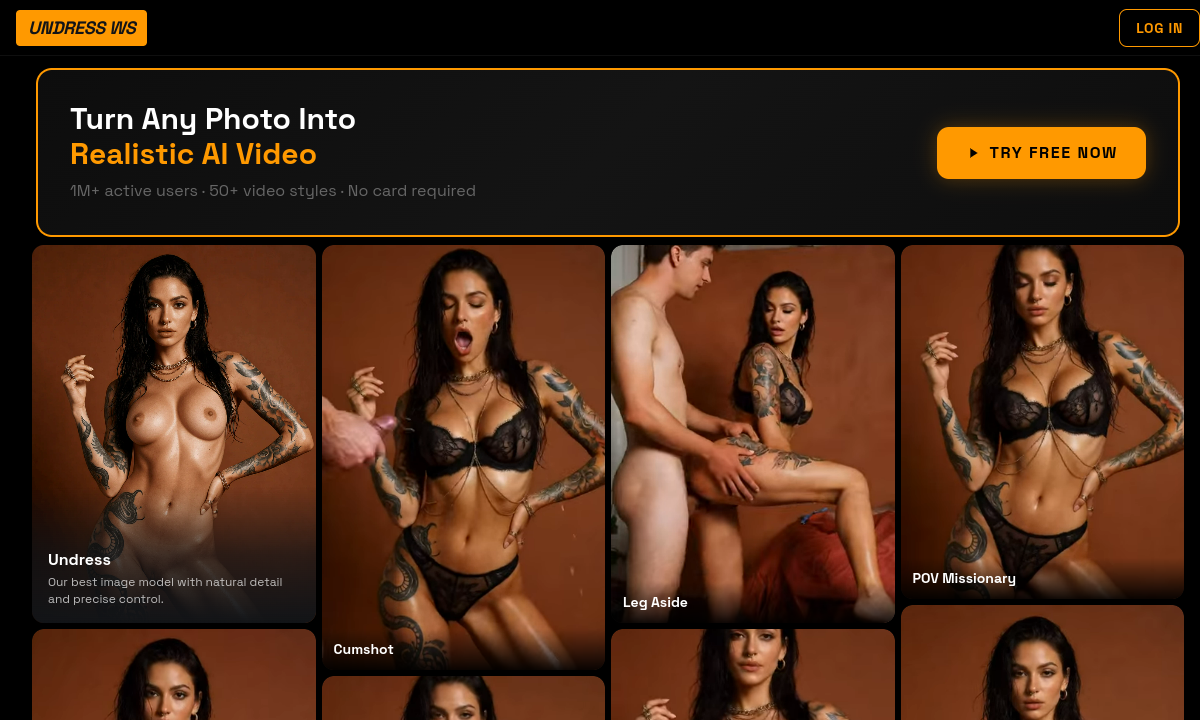
Most adult AI image tools ask you to describe what you want and hope the model interprets it correctly. Undress WS takes a different approach: a scrollable gallery of finished-looking preview cards, each representing a specific output type. You pick the card that matches your intent — a clothing-removal result with adjustable body parameters and skin-tone matching, a face swap, a cumshot overlay, a themed deepfake composite or one of the listed video motion presets — then upload a source image and let the editor do the rest. That preset-first workflow removes the prompt-engineering guesswork that makes some competitors frustrating for first-time users, and it's the single biggest reason Undress WS feels less intimidating than its category peers.
The gallery itself is marketing material, not a live preview of your results. Every card uses the same curated model face, which makes it easy to compare how different scene types and motion styles look on an identical subject, but it also means your own output will depend entirely on your source photo quality. The brief advertises clean, front-facing, well-lit images with minimal compression; extreme angles, heavy shadows and complex clothing boundaries will degrade any AI undress or face-swap result, and Undress WS is no exception. The tool accepts JPG, PNG and HEIC uploads and runs in both mobile and desktop browsers, so there is no app install barrier, though the recommended image preparation still applies.
Where Undress WS separates itself most from single-purpose nudifiers is the image-to-video pipeline. The site describes a large preset library — though it internally contradicts itself, citing both 50-plus and 200-plus motion styles in different hero sections — that turns a still photo into an HD portrait clip. Advertised processing targets are 3 to 10 seconds for image modes and 10 to 20 seconds for video, presented here as the service's own claims rather than independently verified times. The idea is that a single uploaded photo becomes the starting material for multiple output types across one session: an undress still, a face-swapped variant and a short animated clip, all selected from preset cards without re-uploading or switching tools.
Now for the part that should shape your purchasing decision more than any feature list. The homepage explicitly states that paid plans are one-time purchases with no automatic renewal. The terms of service, however, describe subscriptions that renew automatically unless cancelled before the billing cycle ends. These two statements cannot both be true, and the contradiction has not been resolved in the verified source material. This is not a minor copywriting oversight — it's a billing-model disagreement that directly affects whether you are buying a single credit pack or entering a recurring charge. Before you enter any payment method, inspect the final checkout screen for renewal language and compare it against what the homepage promised.
Privacy claims deserve the same scrutiny. Undress WS states that processing is encrypted, uploads are automatically deleted after the session, there is no public gallery or CDN caching and uploaded images are not used for model training. These are policy statements, not independently verified guarantees, and they concern some of the most sensitive media a person can upload—nude or near-nude images of themselves or other consenting adults. The terms require every user to be 18 or older and to hold documented explicit consent from every depicted person. Treat those requirements as real obligations, not boilerplate, especially when face-swap and themed-composite tools could affect people beyond the uploader.
Undress WS makes the most sense for consenting adults who want several kinds of adult edit in one browser session and prefer a preset gallery to a blank prompt. The signup credits require no card, so use them with a fully consented or synthetic image before committing money. The exact allowance is not stated, which means the trial should be treated as a quality check rather than a promise of a complete tour. Continue to a paid tier only after the checkout tells you exactly what you are agreeing to: a one-time credit pack or a subscription.
Merits
- Preset gallery eliminates prompt guessing — you choose a result type from a visual card rather than writing instructions, which makes the first session genuinely fast.
- Broad mode coverage in one tool: AI undress with body-parameter and skin-tone controls, face swap, themed composites, image-to-video motion presets, 4K upscale and photo enhancement.
- Large image-to-video preset library turns a single still photo into a short animated clip without switching services or re-uploading.
- Free trial credits require no card, letting you test the editor's output quality before deciding whether the pricing and billing terms are acceptable.
Disadvantages
- Direct contradiction between the homepage's one-time-purchase claim and the terms' auto-renewal language creates real purchase risk that buyers must resolve at checkout.
- Conflicting preset counts — 50-plus versus 200-plus video styles — signal sloppy documentation and make it hard to trust other numeric claims on the site.
- Exact free-credit allowance, paid pack sizes and per-mode credit costs are not verified, so you cannot calculate value-per-output before signing up.
- All uploads are highly sensitive; privacy promises are not independently verified, and the consent language in the terms remains the user's legal obligation.
Key Features
AI Undress Mode
Clothing removal with adjustable body parameters and skin-tone matching. You upload a front-facing photo, select the undress card and the editor generates a synthetic nude — not a real body revealed under clothes, but a model-generated result influenced by the source image.
Face Swap and Themed Composites
Separate preset categories for swapping a face onto a different body or placing the subject into themed deepfake scenes. The same source image can feed multiple output types in one session.
Image-to-Video Motion Presets
A large library of motion styles converts a still image into an HD portrait clip. The site quotes conflicting preset counts but describes the library as the tool's main differentiator beyond static image editing.
4K Upscale and Photo Enhancement
Post-processing options to upscale resolution and enhance detail on any generated output, useful when the base AI result needs sharpening before it meets the user's quality bar.
Preset-Led Template Gallery
The main interface is a scrollable card grid — each card a result type with a preview — so users select intent visually rather than typing prompts. This lowers the entry barrier for anyone unfamiliar with AI image generation workflows.
Cross-Device Browser Editor
The editor runs in mobile and desktop browsers with JPG, PNG and HEIC upload support. No app installation is needed, and the same session can produce outputs across undress, face-swap, video and enhancement modes.
Editor Score
Undress WS makes a complicated adult-editing toolkit approachable through visible presets for stills and motion. The browser workflow and mode variety score well, while its privacy policy addresses the right concerns without independent verification. The major penalty is billing clarity: one-time language on the homepage conflicts with automatic renewal in the terms, forcing every buyer to resolve the risk at checkout.
| Criterion | Score |
|---|---|
| Mode variety and tool breadth | 17 / 20 |
| Preset-led usability | 16 / 20 |
| Image-to-video range | 16 / 20 |
| Privacy and consent framing | 14 / 20 |
| Billing and pricing clarity | 10 / 20 |
| Total | 73 / 100 |
Rate Plans
The free trial gives you signup credits with no card, enough to run a few outputs and judge whether the preset gallery and generation quality match your expectations. Exact credit counts and per-mode costs are not verified, so you may burn through the trial quickly if you explore multiple modes. Paid access starts at $9.99, which the homepage frames as a one-time purchase with higher tiers adding more credits and queue priority. Before you pay, verify three things in checkout: the credit pack size, the refund terms and whether the renewal language says one-time or recurring. If checkout says recurring, treat it as a subscription regardless of what the homepage promises.
| Plan | Price | Who it suits |
|---|---|---|
| Free trial | $0 | Signup credits to test the browser editor; no card required. Exact allowance is not stated in the verified material, so expect a limited exploration rather than a full session across all modes. |
| Paid access | From $9.99 | Higher credit allowances and queue priority. The homepage claims one-time purchase; the terms describe auto-renewing subscriptions. Confirm which applies to your selected plan before completing checkout. |
The homepage and terms disagree on whether paid plans are one-time purchases or automatically renewing subscriptions. Read the final checkout screen's renewal language before entering any payment method.
Alternative Tools
| Tool | Why compare it |
|---|---|
| PlayBox | Compare character quality, model control, memory, and total monthly cost with Undress.ws. |
| ZenCreator | Compare character quality, model control, memory, and total monthly cost with Undress.ws. |
| PlayFlux | Compare character quality, model control, memory, and total monthly cost with Undress.ws. |
Frequently Asked Questions
What can Undress WS do besides removing clothing?
The tool includes face swap, themed deepfake-style composites, a large image-to-video motion-preset library, 4K upscale and photo enhancement — all accessible from the same browser editor and template gallery.
Does Undress WS reveal a real body under clothing?
No. Generated nudity is synthetic output produced by AI models, influenced by the source image but not a photograph of what is actually beneath the clothing. The service's own language frames it this way.
Is payment one-time or recurring?
The homepage says one-time purchase with no automatic renewal. The terms say subscriptions renew automatically unless cancelled. These two claims contradict each other. Inspect the final checkout screen for the renewal wording before paying.
What kind of photo should I upload?
Clean, front-facing, well-lit images in JPG, PNG or HEIC format work best. Extreme angles, heavy compression and complex clothing layers reduce output quality across all modes.
What happens to uploaded images?
The privacy policy states that processing is encrypted, uploads are deleted after the session, there is no public gallery or CDN caching and uploads are not used for model training. These are service policy claims, not independently verified facts.
How should I use the free trial?
Sign up without a card and test one or two modes with a fully consented or synthetic image. The exact credit count is not verified, so focus on output quality and interface feel rather than trying to exhaust every preset type before deciding on a paid plan.